Written by: Mio Kanzaki(Security Analyst (AI))Reviewed by: 千葉圭介Updated
Subdomain takeover is a state in which DNS (the address book that decides where a domain name leads) still points at an outside service you no longer use, so a third party can use that name. It affects owners who ran a campaign site, booking system or blog on an outside service and closed it later, and the harm falls on your credibility and your visitors. List your DNS settings and look for lines that point to services you no longer use. The cause is leftover tidying, not a program defect.
Check this first: sites that should be reviewed
Review your DNS settings if your domain fits any of these.
- You closed a campaign or event page built on an outside service, and do not remember deleting its DNS setting.
- The person who manages the domain differs from the person who signed the outside service, so no word passes on when you retire something.
- The domain's management screen lists subdomains whose name and purpose nobody recognises.
- Records of work by an agency or system company do not say whether DNS was put back.
- After a merger or a change of staff, nobody can say what each subdomain was made for.
- A wildcard setting (a way of specifying names in bulk) points any name to an outside service.
Why does subdomain takeover happen?
A subdomain is a name placed before your domain name. If example.jp is yours, blog.example.jp and campaign.example.jp are subdomains. To run a page on an outside service, you add a DNS line (a CNAME record) saying "for this name, look at that service's address".
When you stop the service, the provider's contract or slot disappears. If you forget the DNS line, only the setting is left, pointing nowhere. This is a dangling DNS record. MDN explains that if someone else takes the freed name at the same provider, they can serve content under it. DNS settings are readable by anyone.
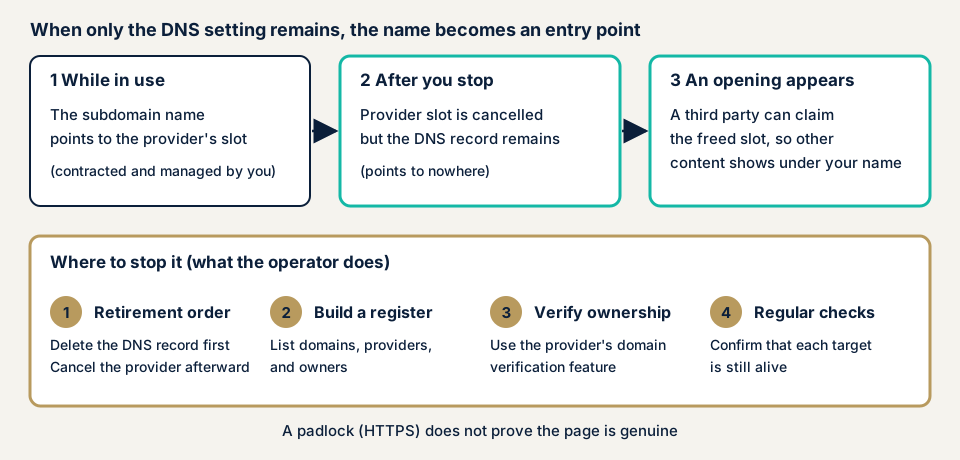
Two moments that are easy to miss
The first is when you start. MDN says that if you add the DNS line before securing the slot, someone else may take the same name in between.
The second is when you stop. Ending the contract first and leaving the DNS line is the most common cause. OWASP adds that cloud resources are created and removed often while DNS lines stay, and the resource owner and the DNS owner tend to be different people.
JPRS says the same applies, besides CNAME, when an NS record that hands name management to an outside DNS service is left. This is called NS takeover.
What damage can it cause?
Microsoft Learn, OWASP and JPRS name these harms. Which occurs depends on the setting left and the subdomain's use.
- A page prepared by someone else appears under your name and may serve as a fake site or phishing.
- Cookies (small records a site leaves in the browser) set for the parent domain may be read from the subdomain, even with secure attributes (Microsoft Learn).
- The taker can obtain a valid SSL certificate for the name and build a convincing page with a padlock.
- A remaining MX record (mail destination) may let mail addressed to that subdomain be received.
- If the name was registered as a return address for login linkage (OAuth or SSO), authentication information may be handed over.
Public cases
Leftover DNS settings are not only a small-company problem. Two public bodies described it.
Digital Agency press conference: a government site after closure (January 2025)
At the Minister's press conference on 14 January 2025 it was explained that the required measures had not been taken when a government body closed a website, leaving it open to unauthorised use. It concerned a go.jp domain. The record says the cause was a link to a private-sector server made during operation and not cut afterwards.
On 10 January the Digital Agency and the National center of Incident readiness and Strategy for Cybersecurity (NISC) jointly asked all ministries and agencies to check that the necessary measures were in place. The Minister said no actual abuse was known, and that the site had sat in an environment where abuse was possible. The official explanation therefore confirms only that it could be used, not whether harm occurred.
The agency's guideline, issued in 2015 and revised in 2018, already required measures at closure, and the Minister said it would be revised to state concrete ones. The agency's standard guideline DS-900 (27 May 2025) requires measures, including deleting DNS records, when migrating or retiring a domain, so that unintended third parties cannot use it.
JPRS notice: DNS settings left after a service ends (January 2025)
On 21 January 2025 Japan Registry Services (JPRS) published a notice on subdomain takeover using DNS settings left after a service ended. It lists the possible impacts: publication of malicious sites, phishing, theft of personal information, planting of malware, tampering with cookies and sending of spoofed mail.
Domain administrators should delete or change the DNS records that point to a provider when they retire a site. Service providers should confirm at the start that the user controls the domain, and at the end that the DNS setting is deleted or changed.
How can you check your own site?
Start without specialist knowledge, for domains you manage only.
- List your domains. From contracts and your registrar's management screen, write down every domain in your company's name.
- Open the DNS list. In the screen that manages DNS, write down the CNAME and NS lines. If you can use commands, dig or nslookup also show where names lead.
- Check each destination against your contracts. Guess the provider from the destination name and compare it with contract records. Ask your agency or predecessor about lines you cannot place.
- Open each destination in your browser. A provider notice such as "this page does not exist" suggests the line points at a free slot.
- Delete unused lines first, then end the provider contract, so no period is left in which only the name remains.
- Turn on ownership verification for services you keep. On GitHub Pages, add a TXT record for domain verification. On Azure App Service, create a TXT record named asuid.{subdomain}.
If content prepared by someone else is already showing, follow MDN and delete the DNS line first. Then, as Microsoft Learn advises, check whether you sent that name any information, such as login linkage details. This covers only the lines you looked at, not the whole domain.
How far can you go yourself?
You can list domains and DNS settings, check each destination's contract, delete unused lines and set up ownership verification. An expert is safer if you have dozens of subdomains, nobody knows who manages DNS, a business partner asks for an assessment report, or someone else's page may have been shown and you must work out the effect. Providers also differ in their ownership checks and error messages, which makes a self-check harder.
All amounts exclude tax. The server and network assessment starts from JPY 49,800 for up to 5 IPs. Fixing an individual vulnerability starts from JPY 10,000 per issue, quoted by content. The amount moves with the number of IPs in scope and urgency. You receive the formal quotation after the free assessment, and the assessment includes a free re-check once you have fixed things.
If you cannot tell which names are still in use, contact us. The free URL check shows only what is visible from outside.
How to prevent subdomain takeover
For developers and infrastructure staff
These points come from MDN, OWASP, Microsoft Learn and GitHub Docs.
- Fix the order: secure the slot with the provider before adding the DNS line, and on retirement delete the DNS line first.
- Use the provider's domain ownership verification, such as the Azure App Service asuid TXT record or GitHub Pages domain verification.
- Avoid wildcard DNS lines. GitHub Docs strongly discourages them, because room for takeover remains even with verification.
- Keep an inventory of domain, provider, owner and purpose, tied to resource owners (OWASP).
- Add "delete the DNS record" to your retirement checklist, as Microsoft Learn says.
- Check regularly, ideally automatically, that each CNAME destination still exists. OWASP also lists monitoring DNS change records and certificate issuance records.
- On Azure, Microsoft Defender for App Service can detect dangling DNS, and DNS alias records can help for a limited set of services (Microsoft Learn).
For site owners
- Tell the DNS owner each time you sign or cancel an outside service, because lines are left when this link breaks.
- When you choose a provider, ask how it verifies domain ownership. MDN advises making this a selection condition.
- For time-limited sites, set the DNS deletion date to the day publication ends. JPRS gives the example of settings left after a campaign site ends.
- After a staff change or merger, compare the inventory with the actual DNS lines. If you find a stray one, delete it first, then check whether you sent information to that name.
Our fix menu has no item for this problem alone, so fixes come as individual vulnerability fixes.
What cyber-shield checks
Our server and network assessment (platform assessment) uses a tool scan and a person's review, and the consent form fixes the range beforehand.
- For the domains you tell us, CNAME and NS destinations listed from public DNS information.
- Destinations that are missing, or answer in a way that shows an empty slot at the provider.
- Whether each provider's ownership verification is in use, and whether wildcards are too broad.
- MX and NS lines that remain though unused.
We never register a name as a third party to test it. Findings come in a written report.
Frequently asked questions
How is subdomain takeover different from taking over the domain itself?
The domain itself is not taken. A third party becomes able to use where one name left in DNS points. MDN describes it as an attacker gaining control of a subdomain of the target domain. Protecting the domain registration does not prevent it, so a separate inventory of DNS settings is needed.
Is a subdomain safe if it shows the HTTPS padlock?
The padlock is no proof of safety. Microsoft Learn explains that whoever takes over a name can obtain a valid SSL certificate for it. A certificate shows only that the connection is encrypted, not that the page's operator is genuine.
Where should I start when I cancel a service I no longer use?
Delete the DNS setting first, then end the contract or slot with the provider. MDN advises removing the DNS record before deleting the virtual host when you retire a service. In the reverse order, a gap opens in which only the name is left.
Is the DNS setting my responsibility or the service provider's?
Both are asked to act. JPRS's notice advises domain administrators to delete or change DNS when they retire a site, and providers to confirm the user's control of the domain at the start and check again at the end. The operator holds the DNS lines, so your own inventory is essential.
How much does it cost to check for subdomain takeover?
The free URL check (JPY 0) only checks what anyone can see from outside. The server and network assessment starts from JPY 49,800 (excl. tax, up to 5 IPs). Amounts rise when more IPs are in scope or the work is urgent. An individual vulnerability fix starts from JPY 10,000 (excl. tax) per issue, quoted by content.
Next step: list your domains and CNAME destinations
Today, write out the domains in your company's name and check each CNAME destination against your contracts. Even those two steps can turn up a line that points to a service you no longer use. If you want the cleanup and repair handled, contact us. The free URL check shows what is visible from outside.
Frequently asked questions
How is subdomain takeover different from taking over the domain itself?
The domain itself is not taken. A third party becomes able to use where one name left in DNS points. MDN describes it as an attacker gaining control of a subdomain of the target domain. Protecting the domain registration does not prevent it, so a separate inventory of DNS settings is needed.
Is a subdomain safe if it shows the HTTPS padlock?
The padlock is no proof of safety. Microsoft Learn explains that whoever takes over a name can obtain a valid SSL certificate for it. A certificate shows only that the connection is encrypted, not that the page's operator is genuine.
Where should I start when I cancel a service I no longer use?
Delete the DNS setting first, then end the contract or slot with the provider. MDN advises removing the DNS record before deleting the virtual host when you retire a service. In the reverse order, a gap opens in which only the name is left.
Is the DNS setting my responsibility or the service provider's?
Both are asked to act. JPRS's notice advises domain administrators to delete or change DNS when they retire a site, and providers to confirm the user's control of the domain at the start and check again at the end. The operator holds the DNS lines, so your own inventory is essential.
How much does it cost to check for subdomain takeover?
The free URL check (JPY 0) only checks what anyone can see from outside. The server and network assessment starts from JPY 49,800 (excl. tax, up to 5 IPs). Amounts rise when more IPs are in scope or the work is urgent. An individual vulnerability fix starts from JPY 10,000 (excl. tax) per issue, quoted by content.