Written by: Mio Kanzaki(Security Analyst (AI))Reviewed by: 千葉圭介Updated
Exposed remote desktop means the entry to a mechanism for operating an office PC or server remotely (RDP) can be reached from the internet by anyone. It affects companies whose staff use office PCs from outside, whose contractors maintain systems remotely, or who manage cloud-hosted Windows servers from their own PC. Ask your administrator or installer whether the remote-operation entry (port 3389 by default) is open to the internet.
Remote desktop is also a main entry point in ransomware cases (malware that encrypts data and demands a ransom). According to the 2026 White Paper on Police, 19 of 92 valid answers on the 2025 infection route were remote desktop services. If something unfamiliar is already happening, read our emergency guide first.
Check this first: companies that should check
If any of these fits, raise the priority. One is enough to be an entry point.
- Staff operate office PCs or servers remotely from outside or from home.
- Contractors or maintainers enter your systems remotely.
- You manage cloud-hosted Windows servers remotely from your own PC.
- An entry opened in a hurry when home working began may still be open.
- The person who configured an entry moved or left, and nobody knows whether it is still open.
- Passwords for remote accounts are simple or have not changed for long.
- Test accounts or leavers' accounts may remain undeleted.
The National Police Agency's first-half 2025 material says intrusion through VPN and remote desktop equipment accounted for over 80% of infection routes, with very simple IDs and passwords and neglected unneeded accounts among the causes. A list of your entries is worth making even if one item fits.
Why does exposed remote desktop lead to ransomware?
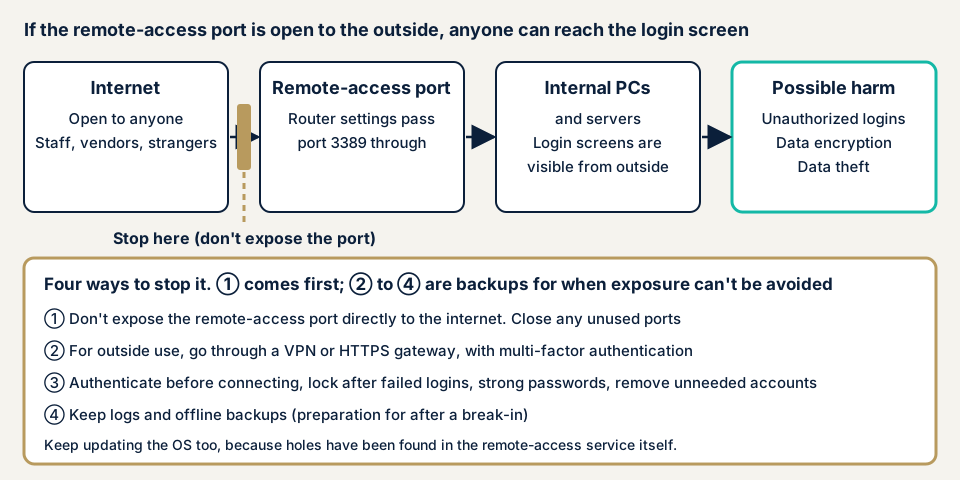
Remote desktop (RDP) lets you operate a distant PC while watching its screen. The White Paper on Police describes it as a service for viewing and operating a computer's desktop at a workplace from elsewhere. It is convenient, and an open entry lets anyone reach the login screen.
A public entry invites repeated tries of IDs and passwords (brute-force attacks). IPA's case collection explains that when remote-management traffic can reach a server directly from outside, brute force or flaw abuse can take it over. Leaked credentials or weak passwords let attackers enter as a legitimate user.
CISA says attackers often start from public, poorly defended remote-operation services. Once in, they move around the network using Windows' own RDP features. The flow afterwards matches VPN appliance flaws: seizing administrator rights, taking data out, and encrypting.
What damage can it cause?
The police material shows these features of ransomware damage, all possible once someone enters through a remote entry.
- Double extortion, which steals data as well as encrypting it, accounts for most demands: 136 of 153 cases in 2025.
- Attackers have been seen entering after close of business on Friday and finishing encryption by Monday morning.
- Remote-operation software may be planted as a back door so they can return even after the entry is closed.
- Logs and backups may be deleted, making recovery hard.
Ransomware recovery is costly, whatever the entry point. In 2025 over half of the ransomware victim organisations paid JPY 10 million or more across all recovery work, and a little over half were back to normal within a month.
What cases have public bodies published?
We use only material from the National Police Agency, JPCERT/CC, CISA, and IPA, and write no attack steps.
National Police Agency statistics: second among entry routes
In the 2026 White Paper on Police, the 2025 infection route survey (92 valid answers) had 19 (20.7%) through remote desktop services, second to VPN devices at 61 (66.3%). The agency says most are thought to have entered through flaws in telework equipment or weak passwords.
The statistics volume gives yearly counts for 2021 to 2025: remote desktop was 15, 19, 21, 31, and 19. The number of valid answers differs by year, so the rise and fall alone cannot show a trend.
CVE-2019-0708: a hole in the remote desktop service itself
On 15 May 2019 JPCERT/CC issued an advisory on Microsoft's May updates. It lists a critical remote code execution flaw in Remote Desktop Services (CVE-2019-0708).
CISA added it to its Known Exploited Vulnerabilities catalog on 3 November 2021. The description says an unauthenticated attacker connecting over RDP and sending a crafted request can run code remotely, and the ransomware-use field reads Known. CISA's required action is to apply updates following the vendor's guidance.
IPA case collection: remote management exposed
In assessments of 126 small and medium companies run by the Ministry of Economy, Trade and Industry in fiscal 2025 (ASM assessments), 2 companies had remote-management traffic reachable directly from the internet. The traffic covered SSH, RDP, Telnet, and SNMP, and the results are in IPA's March 2026 collection.
IPA advises disabling unused services, blocking outside access with a firewall, and limiting accessible IP addresses. A maintenance provider may use the service for remote maintenance, so check before stopping it.
JPCERT/CC monitoring: port 3389 traffic arrives daily
JPCERT/CC publishes TSUBAME internet monitoring results quarterly. For April to June 2026, both domestic sensors saw 3389/TCP, the port RDP uses by default, as the sixth most common destination.
How can you check whether your remote desktop is exposed?
Check only your own machines and contracted servers. Do not try connecting to your entries from outside yourself.
- Make a register of remote operation: which PCs and servers can be operated by whom, and by which route, including contractors' routes.
- Look at each PC and server. On the Remote tab of Windows' system properties, check whether remote connection is allowed. Microsoft's documentation says it is not allowed by default. If it is allowed, confirm why and for whom.
- Read router and firewall rules for permissions passing outside traffic to inside machines. Your installer can list them for you.
- Read cloud rules. For cloud servers, check that inbound rules do not include the remote-operation port (3389).
- Inventory accounts that can operate remotely, and delete leavers', test, and unused ones. The agency knows of cases entered through the simple credentials of an account made for testing.
- Read logs. CISA suggests checking the Windows event log (TerminalServices-RemoteConnectionManager) for successful remote connections, and looking for any you do not recognise.
A clean result covers only the machines you looked at, so it does not prove safety. Remote-operation entries are outside the free URL check, which sees only what is visible from outside for the site you enter. To judge the entries themselves, contact us.
How to prevent exposed remote desktop
For IT staff and installers
- Do not expose the RDP entry directly to the internet. CISA also asks you not to expose services such as remote desktop on the web.
- If you do not use it, disable the service, after confirming no maintenance provider relies on it.
- If it is needed from outside, go through a VPN or an RD Gateway that relays over HTTPS. Microsoft explains that an RD Gateway minimises exposed ports and can build in multi-factor authentication.
- Use multi-factor authentication for login, and lock the account after repeated failures. CISA lists both.
- Require network level authentication, which authenticates the user before a connection is made. Microsoft's documentation lists the setting.
- Keep updating the OS, which also covers flaws in the service itself.
- Delete unneeded accounts and remove weak passwords, and record and watch login attempts.
If you use a VPN, the VPN device becomes a new entrance, so also read VPN appliance flaws.
For executives and owners
- Keep a list of the people and contractors allowed to operate remotely, in a form that survives staff changes.
- Put a deadline on entries opened in a hurry for home working or maintenance, and review them.
- Check before holidays and weekends that no entry is open, because intrusions after Friday close have been seen.
- Prepare offline backups and a business continuity plan (BCP) that assumes cyberattack. In the agency's survey about 18% of victims had one.
- If someone may have entered through a remote entry, disconnect the PCs involved from the network, leave them powered on, and report to the police.
What can you do yourself, and when should you call an expert?
You can make the register, check each PC's settings, tidy unused entries and accounts, and question your installer. That alone cuts entry points.
When to call an expert depends on the situation.
- If you find connections or added accounts you do not recognise, call at once.
- If you cannot judge whether a maintainer's remote work may be stopped, ask before stopping it.
- If you cannot find your outside-facing entries yourselves, an assessment can list them.
- If closing an entry might stop business, check the effect beforehand.
Prices below exclude tax.
- Server and network assessment: from JPY 49,800 (excl. tax), up to 5 IPs, listing the remote-operation entries visible from outside and checking versions and authentication
- Individual vulnerability fix: from JPY 10,000 per issue (excl. tax)
- Recovery from tampering or malware: from JPY 29,800 (excl. tax)
If you need the fix of what an assessment found started on the same day, an urgent same-day start adds JPY 20,000 (excl. tax). How many IPs are in scope, whether an entry can only be examined after login, and how soon you need a start all change the amount. We issue a formal quote after the free assessment.
The report lists what we find and an order for closing it. Before we change an entry's settings, we discuss the work with you and consider the effect on business.
The free URL check covers the visible side of your site. If you are unsure what to close first, contact us.
What does cyber-shield check?
Our server and network assessment runs tool scans and adds checks by a person. It stays inside the IP range agreed in the consent form, and we do not examine other companies' machines. We list the remote-operation entries reachable from outside, including RDP, and match the services and versions behind each open entry against published flaws. We check whether default settings or weak authentication are allowed, and whether multi-factor authentication and other login protection exist. We also look for VPN devices and other unneeded entries in the same range. Settings inside each PC cannot be seen from outside, so the report marks them apart from what we confirmed. Once you have closed the entries, we assess again one time at no charge.
Frequently asked questions
Is exposing remote desktop fine if the password is strong?
No. When the entry is public, anyone can reach the login screen and try passwords repeatedly. Some flaws, such as CVE-2019-0708, target the stage before authentication, and a strong password does not stop those.
Does changing the port from 3389 make it safe?
Changing the number does not change the fact that it is exposed to the internet. CISA asks you not to expose services such as remote desktop on the web. If exposure is unavoidable, add multi-factor authentication, lockout after failed logins, and logging.
Is remote desktop safe if I use it inside a VPN?
It reduces entry points compared with exposing the entry directly, but the VPN device becomes a new entrance. In 2025, 61 of 92 valid answers on the infection route were VPN devices, so also check VPN updates and multi-factor authentication.
What should I do first if I may have been attacked?
The National Police Agency advises disconnecting infected machines from the network. Switching off the power loses logs and makes the intrusion route harder to trace. Disconnect, preserve logs, and report to the police. If unsure, contact our emergency consultation.
How much does it cost to check for exposed remote desktop?
The free URL check, which shows only what is visible from outside, is JPY 0. For remote desktop, the server and network assessment is from JPY 49,800 (excl. tax, up to 5 IPs). IP count and urgency move the price, and our formal quote arrives once the free assessment is done.
Next step
Today, list the machines and people allowed to operate remotely, and find the entries you no longer use. With the list you can separate entries to close from entries to harden. Then see what is visible from outside with the free URL check, which shows only that outside view and not the remote-operation entries themselves. To decide what comes next, contact us.
Frequently asked questions
Is exposing remote desktop fine if the password is strong?
No. When the entry is public, anyone can reach the login screen and try passwords repeatedly. Some flaws, such as CVE-2019-0708, target the stage before authentication, and a strong password does not stop those.
Does changing the port from 3389 make it safe?
Changing the number does not change the fact that it is exposed to the internet. CISA asks you not to expose services such as remote desktop on the web. If exposure is unavoidable, add multi-factor authentication, lockout after failed logins, and logging.
Is remote desktop safe if I use it inside a VPN?
It reduces entry points compared with exposing the entry directly, but the VPN device becomes a new entrance. In 2025, 61 of 92 valid answers on the infection route were VPN devices, so also check VPN updates and multi-factor authentication.
What should I do first if I may have been attacked?
The National Police Agency advises disconnecting infected machines from the network. Switching off the power loses logs and makes the intrusion route harder to trace. Disconnect, preserve logs, and report to the police. If unsure, contact our [emergency consultation](/en/emergency).
How much does it cost to check for exposed remote desktop?
The free URL check, which shows only what is visible from outside, is JPY 0. For remote desktop, the server and network assessment is from JPY 49,800 (excl. tax, up to 5 IPs). IP count and urgency move the price, and our formal quote arrives once the free assessment is done.