Written by: Mio Kanzaki(Security Analyst (AI))Reviewed by: 千葉圭介Updated
A vulnerable dependency is a state where a library written by someone else, built into your own system as a part, still carries a publicly known weakness (a vulnerability). It concerns organizations that build and run their own web apps or business systems, and a system an agency built for you is no exception. Start by listing the names and versions of the parts you use and comparing them with published vulnerabilities.
IPA published its Top 10 Information Security Threats 2026 on 29 January 2026. For organizations, supply chain and contractor attacks are second on that list. Attacks that exploit system vulnerabilities are fourth. A weakness left in a library falls under the fourth.
Check this first: sites that should be reviewed
Any one of the following is a reason to build an inventory of your libraries.
- You have no list of which libraries, in which versions, your system uses.
- Nobody has updated the libraries since the agency delivered the system.
- The record that pins part versions (the lock file) is not kept with the code.
- A library whose developer stopped updating it is still in use.
- You serve old versions of JavaScript libraries on your screens.
- Nobody is named to receive vulnerability alerts such as those from Dependabot.
- You do not know what share of the whole is code you did not write yourself.
Why does a vulnerable dependency become an entrance?
Most systems are built by combining libraries, bundles of common functions written by others. Parts use other parts, so parts you never chose yourself (indirect dependencies) come along too.
OWASP explains that a part runs with the same permissions as the system it is built into, so a flaw in a part has a serious effect. A flaw can come from a mistake, or from a backdoor planted on purpose. In the 2021 edition of the OWASP Top 10, vulnerable and outdated components rank sixth.
In data OWASP collected, the incidence rate for this category averaged 8.77% and reached 28% at the maximum (27.96%). As an example, it cites a weakness in Struts 2 (CVE-2017-5638), long linked to major breaches.
When a weakness is found, the developer releases a fixed version, and the weakness gets a CVE, a worldwide number for vulnerabilities. The number and the affected versions are public, so attackers read the same information. In MITRE's CWE, a classification of software weaknesses, relying on third-party parts with known weaknesses is CWE-1395, and using parts the developer no longer maintains is CWE-1104.
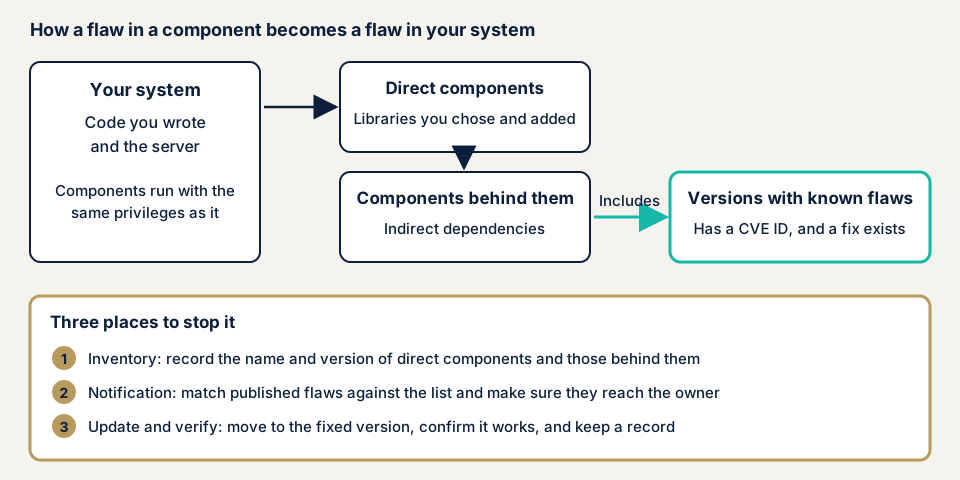
As the diagram shows, weaknesses lurk not only in parts you chose but in the parts beyond them. The list should include both the parts you use directly and the parts those parts use.
What damage can happen?
- A weakness in a part is used to run unintended processing on your server.
- Customer or partner information is taken outside.
- The system becomes a foothold for intrusion, and operations stop.
- If a malicious version gets mixed in, harm can reach users through apps running in the browser.
How this differs from similarly named vulnerabilities
Unpatched software is missed updates across products you operate, such as the OS, servers, and VPN equipment. This page is limited to parts built into your own system.
Insecure deserialization is a problem in how code that rebuilds received data is written. Third-party script tampering is rewriting of scripts loaded from another company's server, a different route.
Cases from public bodies and official announcements
JPCERT/CC: the Apache Log4j weakness (December 2021)
JPCERT/CC issued an advisory (JPCERT-AT-2021-0050) on 11 December 2021 and updated it until 4 January 2022. It concerns a weakness (CVE-2021-44228) in Apache Log4j, a part that produces Java logs (records of activity), through which arbitrary code could be run. Affected are the Log4j-core 2 series, versions before 2.15.0.
The advisory reported that traffic attempting to abuse the weakness had been seen in Japan and that proof-of-concept code was public. Fixed versions came out in stages. After 2.15.0, 2.16.0 and 2.17.0 followed for other weaknesses, and at the time of the update the latest is 2.17.1 (Java 8 and later).
It is a case where updating once was not the end, and later fixes had to be followed. The basic response is updating to a fixed version.
GitHub and npm: malicious versions slipped in (September 2025)
On 8 September 2025, versions containing malicious code were published for widely used npm packages such as chalk and debug. In its official blog of 23 July 2026, GitHub explains that an attacker took one maintainer's credentials by phishing, which steals them through a fake screen, and published tampered versions of a dozen or so packages. Together they were downloaded more than 2 billion times a week.
The tampered versions were public for about two hours before npm took them down. GitHub writes that when loaded into an app running in the browser, the code rewrote cryptocurrency wallet addresses. The chalk issue records that npm withdrew the infected versions the same day, and the switch to fixed versions such as chalk 5.6.2.
Unlike a case of leaving a known weakness alone, this is a case where malice got mixed into the part itself. GitHub cites it in explaining why Dependabot now waits 3 days after publication before proposing ordinary version updates (a cooldown). Security updates, for a weakness that is already public, are proposed without waiting.
How can you check the dependencies in your own system?
Non-specialists can follow these steps, on systems they manage.
- List the parts you use. Include the parts you use directly and the parts those parts use. For Node.js, the clues are package.json and package-lock.json. For PHP, they are composer.json and composer.lock.
- Compare versions with published weakness information. npm for Node.js has a command,
npm audit. It sends the project's dependencies to the registry, where parts are kept, and returns reports of known weaknesses.npm audit fixapplies fixes, but a person checks what cannot be fixed automatically. By default it needs the package-lock.json that pins versions. - If you use GitHub, turn on Dependabot alerts. You are notified when a repository's dependencies have a known weakness, and a fixed version is shown if one exists. Alerts cover only advisories GitHub has reviewed.
- Check the developer's maintenance status. For a part whose updates stopped, no fix may appear even when a weakness is found. CWE-1104 describes this state.
- Separate parts that run in production from parts used only in development. With
--omit=dev, npm audit leaves development parts out of the results. - Record the reason, owner, and deadline for what you cannot fix. Writing down who will do it by when prevents neglect.
This shows only what you checked by hand. If you are unsure, contact us for the next step. The free URL check shows only what is visible from outside, such as old JavaScript library versions.
Fixing vulnerable dependencies
The work differs for those who write and run the code and those who commission and use it. In each case, begin with the inventory of libraries.
For developers and agencies
- Keep the list of parts as an SBOM. METI's guide to introducing SBOMs (version 2.0, published 29 August 2024) sets out, in chapter 7, the steps for managing vulnerabilities with an SBOM (software bill of materials).
- Remove parts you do not use, and reduce what can be attacked.
- Get parts from the official distribution source. OWASP advises fetching them over a secure channel and choosing signed packages.
- Pin versions with the lock file, and apply updates after confirming behavior. OWASP also lists as risky a practice of not testing compatibility after an update.
- Name who receives vulnerability alerts, and fix in order, starting with what affects production. OWASP says batching updates monthly or quarterly leads to slow response.
- Automate update proposals. Dependabot security updates creates proposals to move to a fixed version. To use it, turn on three things: the dependency graph, Dependabot alerts, and security updates. It covers parts written in manifests or lock files, and indirect dependencies may not be fixable.
- You can also set a delay before taking in a version just published. Dependabot's cooldown delays version update proposals, with a default of 3 days. It does not apply to security updates.
- When you cannot update right away, buy time with a virtual patch (a temporary defense that stops abuse before it reaches the part) or by limiting exposure, and plan the update.
For site owners
- At delivery, make it a contract term to receive the list of parts in use. METI's guide includes, in an appendix, examples for deciding in order contracts the requirements for SBOMs, who is responsible, and who bears the cost.
- Decide who updates parts and how often. The mitigations for CWE-1395 also ask you to make clear whether the developer, the operator, or another contractor is responsible for fixing third-party parts.
- WordPress plugins and themes are parts your site depends on too. Item 1 of our fix menu, updating WordPress core, themes, and plugins and deleting plugins you do not use, covers them.
- Decide who you hand updates to. Maintenance Lite is JPY 9,800 per month (excl. tax) and includes a monthly update of core and plugins, daily backups, tampering monitoring, a monthly report, and first-line response to failures.
What can you do yourself, and when should you call an expert?
You can make the list, turn on alerts, check versions, and settle owners and deadlines. Telling whether your code has a route to a part's weakness takes experience. Ask an expert early in any of these cases:
- Your code runs to tens of thousands of lines and you cannot tell which parts are used.
- The delivery documents lack a parts list.
- You cannot update a fixed part for fear of side effects.
- Alerts pile up with no order of work.
- You depend heavily on an unmaintained part.
The free URL check (JPY 0) shows only what is visible from outside.
Prices are excl. tax. Source code assessment is quoted individually, with a guide of from JPY 50,000 per 10,000 lines. For 30,000 lines, from JPY 150,000 is the starting point. An individual vulnerability fix is from JPY 10,000 per issue. One re-assessment after fixes is included.
The amount rises with line count, number of languages and frameworks, and scope. Limiting it to code you wrote cuts effort, and reading in the parts you took in adds to it. The formal quotation follows the free assessment.
What cyber-shield checks
Our source code assessment combines static analysis, an automatic reading of code without running it, with review by a person. For dependencies, we check whether the libraries you use carry publicly known weaknesses. Before reading anything, we agree the scope and method in a signed consent form. Code outside that scope stays unread.
- We list the names and versions of the libraries in use, direct and indirect.
- We match the versions against known weaknesses (CVE numbers).
- We check whether a fix exists and whether the developer still maintains the part.
- A person reads each candidate the tools raise and removes false positives, findings flagged as holes that are not.
- The report states which version of which part is the problem, with the order to fix.
The languages we cover are PHP (including Laravel), Node, Python, Ruby, Java, and .NET. For any other language, please ask first. What we see is the version at the time of the assessment. Weaknesses published afterwards need to be followed through an alert mechanism.
Frequently asked questions
Where should I start when checking dependencies?
Start by making a list of the parts you use. For Node.js, package.json and package-lock.json are the clues. For PHP, they are composer.json and composer.lock. Include both the parts you use directly and the parts those parts use, and record names and versions.
There are too many vulnerability alerts to handle. Which should I fix first?
Look in this order: parts that run in production, parts tied to an entrance reachable from outside, and parts with a fix available. npm audit can leave out parts used only during development, through an option. For what you cannot fix, record the reason, the owner, and the deadline.
Will automatic updates make me safe?
Automating updates helps, but it is not enough. In September 2025, versions containing malicious code were public for about two hours. GitHub made Dependabot wait 3 days after publication before proposing ordinary version updates. Security updates, which aim to fix a vulnerability, are proposed without waiting.
What if no fix is released, or the developer stopped maintaining the part?
Consider replacing it with another part. If you cannot replace it right away, buy time with a virtual patch (a temporary defense, such as through a WAF) or by limiting exposure. OWASP also lists virtual patching as a response for unmaintained parts.
How much does a check of dependencies cost?
The free URL check (JPY 0) confirms only what anyone can see from outside. Reading the code is source code assessment, quoted individually, with a guide of from JPY 50,000 per 10,000 lines (excl. tax). The number of lines and languages change the amount.
Next step: three things to start today
Make the list of the parts you use, turn on vulnerability alerts, and settle who updates and by when.
To learn whether weaknesses remain in your parts, contact us to settle the scope. The free URL check shows only what is visible from outside. Where damage is already suspected, start with the emergency guide.
Frequently asked questions
Where should I start when checking dependencies?
Start by making a list of the parts you use. For Node.js, package.json and package-lock.json are the clues. For PHP, they are composer.json and composer.lock. Include both the parts you use directly and the parts those parts use, and record names and versions.
There are too many vulnerability alerts to handle. Which should I fix first?
Look in this order: parts that run in production, parts tied to an entrance reachable from outside, and parts with a fix available. npm audit can leave out parts used only during development, through an option. For what you cannot fix, record the reason, the owner, and the deadline.
Will automatic updates make me safe?
Automating updates helps, but it is not enough. In September 2025, versions containing malicious code were public for about two hours. GitHub made Dependabot wait 3 days after publication before proposing ordinary version updates. Security updates, which aim to fix a vulnerability, are proposed without waiting.
What if no fix is released, or the developer stopped maintaining the part?
Consider replacing it with another part. If you cannot replace it right away, buy time with a virtual patch (a temporary defense, such as through a WAF) or by limiting exposure. OWASP also lists virtual patching as a response for unmaintained parts.
How much does a check of dependencies cost?
The free URL check (JPY 0) confirms only what anyone can see from outside. Reading the code is source code assessment, quoted individually, with a guide of from JPY 50,000 per 10,000 lines (excl. tax). The number of lines and languages change the amount.