Written by: Mio Kanzaki(Security Analyst (AI))Reviewed by: 千葉圭介Updated
Privilege escalation is when someone who has broken into a server rises beyond the low rights they obtained to administrator rights (root or Administrator). Companies that manage their own servers, and site owners who left a server with an agency without knowing what is inside, are affected, and the company using the server and its customers are harmed. List the accounts with administrator rights and remove those you do not need.
It is the second step, not the first: the lower the wall between ordinary and administrator rights, the more one intrusion turns into damage to the whole server.
Check this first: sites that should be reviewed
A server run as it was first built tends to fit several of these. Any one is worth checking.
- You manage a VPS, dedicated server, or in-house server yourself.
- Nobody has decided who updates the OS and server software, or when.
- Administrator accounts are used for daily work.
- Several servers share one administrator password.
- You do not know which account the web server or database runs under.
- Accounts of former staff or finished contractors may remain.
- You have never looked at the records of administrator rights being used.
How does privilege escalation happen?
An OS limits what each user and program may do, which is their rights. With ordinary rights you cannot read others' files or change settings. Privilege escalation crosses that wall to administrator rights.
MITRE's CWE-269 covers improper privilege management: a product fails to assign, modify, track, or check the rights of actors such as users and processes, creating control beyond what was intended. Its listed impacts include gaining privileges and impersonating others.
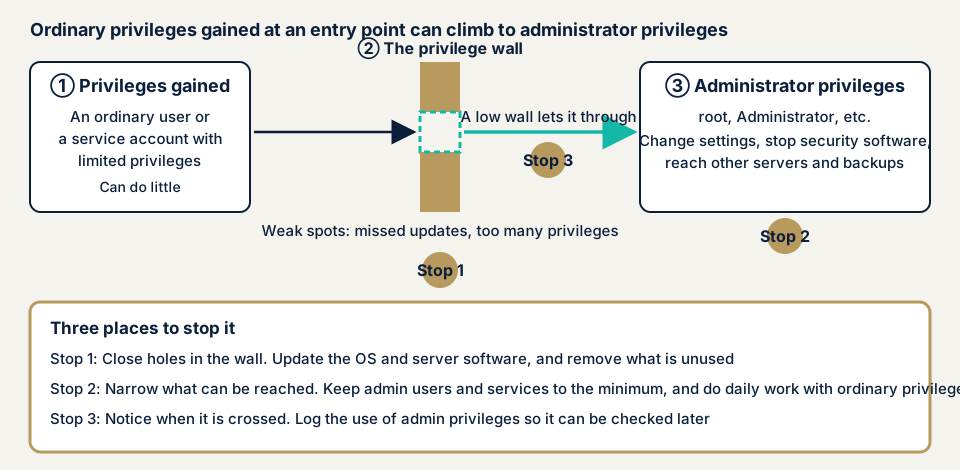
Four reasons the wall gets low
- Unpatched flaws remain in the parts that handle rights, as in the sudo case below.
- A service runs with more rights than it needs. CWE-250 says running above the needed level creates new weaknesses and magnifies the effect of others.
- Too many people or accounts hold administrator rights. NIST SP 800-53 sets out least privilege, allowing only what a task needs, as control AC-6.
- Daily and admin accounts are not separated, and passwords are reused.
How does it differ from similar flaws?
Broken access control is mostly a website state where a user reaches what is not permitted. Privilege escalation is a rise inside the server or OS. Unpatched software can be both the entrance and the hole in the wall, and the damage from commands run through OS command injection depends on the rights they run with.
What is lost when privileges are escalated?
The National Police Agency describes the typical ransomware flow: an intruder tries to take administrator rights and disable security, explores the network for important data and backups, then steals and encrypts data, often encrypting backups too (2025 edition, pp. 15-16). JPCERT/CC's FAQ adds that if encryption hits several systems at once, administrator accounts such as the domain controller's (the server managing users and PCs) may have been seized and used to distribute the ransomware.
Damage tied to escalation includes security software being stopped or reconfigured, logs erased so investigation is hard, damage spreading sideways to other servers, data stolen and encrypted, and backups encrypted so restoring fails. In 2025 the agency counted 226 ransomware cases, about 60% at small and medium firms (pp. 13-14). These are ransomware-wide figures, not figures for privilege escalation alone.
What cases have public bodies and victims published?
Handa Hospital investigation report (2022)
On 7 June 2022 Handa Hospital in Tsurugi Town, Tokushima, made public an expert panel report on ransomware damage that started in the small hours of 31 October 2021. Electronic records were encrypted, and normal care resumed on 4 January 2022.
The report names weaknesses in the hospital's Active Directory (the mechanism managing user and PC rights centrally). Domain users belonged to an administrator group, so when malware arrived it held administrator rights and could change OS settings freely. The prompt for rising privileges (UAC) was left at its default, and requiring confirmation for every rise could have stopped or delayed the attack (pp. 29-30). The entry point was an unpatched flaw in a VPN device. With current fixes, running antivirus, lockout configured, and standard-user operation, the report says the attack might have been delayed or stopped.
Osaka General Medical Center report (2023)
The Osaka General Medical Center (大阪急性期・総合医療センター) published a summary of its committee's report on 28 March 2023 about a cyberattack on 31 October 2022. The electronic records system was encrypted. Restarting the core system's servers took 43 days, and full recovery of clinical systems 73 days.
The committee named weak internal configuration as a factor in the spread. Every user held administrator rights, so the attacker used them and removed the antivirus software. Its prevention steps are a switch to standard users and applying user access control. It also says that even after an intrusion, proper default settings might have stopped a wide sideways spread.
JPCERT/CC advisory on sudo (2021)
On 27 January 2021 JPCERT/CC issued an advisory on the sudo flaw CVE-2021-3156 (sudo runs commands with administrator rights). It affects sudo 1.8.2 to 1.8.31p2 and 1.9.0 to 1.9.5p1, and a local user (anyone who can log in to the server) could escalate to root. Because proof-of-concept code could spread and be used, it urged prompt action, namely updating to the fixed versions from each distributor. CISA added it to its catalog of exploited vulnerabilities on 6 April 2022. Polkit's CVE-2021-4034 in the same catalog carries a note that ransomware use has been confirmed.
How can you check privileges on your own server?
Listing is possible without specialist knowledge. Check only servers you manage, and ask your agency or maintainer for screens only administrators can see.
- List accounts with administrator rights. On Linux, see who is in the sudo or wheel groups. On Windows, see the Administrators group in the local users and groups screen. On WordPress, filter the user list by the administrator role.
- Ask whether each is still needed. Delete or disable former staff, finished contractors, and unused work accounts.
- Check daily and admin use are separate, meaning no mail or web browsing as an administrator.
- Ask which account each service runs under. If the web server or database runs with administrator rights, ask about moving it to a dedicated ordinary account.
- Match OS and main software versions against published information in JVN iPedia, JPCERT/CC advisories, and CISA's catalog.
- Check for password reuse. Administrator passwords should differ per server or PC, and two-step verification should be available.
- Check the records of administrator use. Can you trace who used admin rights and when? Check how long Windows security logs and Linux authentication logs are kept.
This shows only what you checked and does not mean the whole server is safe. How rights are granted is invisible from outside, so see the outside view with the free URL check.
How to prevent privilege escalation
The shared idea is least privilege: grant only the rights needed.
For developers and server administrators
- Give users and programs only the rights a task needs (NIST AC-6), and run the web server and database as ordinary accounts made for them (CWE-250).
- Isolate functions that need administrator rights in one place, take the right only when needed, and drop it at once (CWE-250).
- Do daily work with accounts that lack administrator rights (NIST AC-6(2)), review who holds them regularly (AC-6(7)), and log their use (AC-6(9)).
- Decide who updates the OS and server software, and when.
- On a Windows domain, run standard users and require confirmation for every rise, as both hospital reports note. Use separate administrator passwords per server or PC and enable lockout.
For site owners
- Cut administrator accounts to the people needed and remove weak passwords (item 12 on our fix menu). On WordPress, update the core, themes, and plugins and delete unused plugins (item 1), and add two-step verification (item 3).
- Ask your agency or maintainer for the list of people with administrator rights, the accounts services run under, and how long logs are kept.
- If intrusion or abuse of rights is suspected, do not switch the power off in a panic. The National Police Agency warns that doing so loses traces and hampers investigation. Contact our emergency consultation and disconnect infected machines from the network.
A WAF (a filter that blocks suspicious traffic at the entrance) only helps at the entrance. Escalation happens after entry, so design rights and updates separately.
What can you do yourself, and when should you call an expert?
You can list accounts, tidy unneeded ones, update, and question your agency. That removes many causes of a low wall.
Call an expert if you manage servers yourself and nobody knows the configuration, if several servers are linked by one administrator account, if you gave an outside contractor administrator rights, or if the server holds personal or payment data. The free URL check (JPY 0) shows only what is visible from outside, so it cannot see rights inside the server. Prices below exclude tax.
- Server and network assessment: from JPY 49,800 (excl. tax), up to 5 IPs
- Penetration test, within a scope agreed with our staff: from JPY 498,000 (excl. tax)
- Individual vulnerability fix: from JPY 10,000 per issue (excl. tax)
Wider scope, more targets, or an urgent start raise the amount. The fixes get a free re-check, and the formal quote arrives once the free assessment is done.
To see the outside view first, use the free URL check. If you are unsure whether you need a penetration test, contact us.
What does cyber-shield check?
Our penetration test examines only the scope agreed first in the consent form, with tools and a person's judgement, and touches nothing outside it. Within that scope we test whether a route exists from low rights to administrator rights, match the OS and main software versions against published flaws, and check whether the web server or database runs with more rights than it needs. We count the accounts with administrator rights and look for leftover unneeded ones, and check that administrator use is logged and can be traced afterwards. A report follows, fixes start only after you accept the quote, and one re-assessment follows the fixes.
Frequently asked questions
How is privilege escalation different from broken access control?
Broken access control, mostly on websites, lets a user reach data or actions they are not allowed. Privilege escalation is a rise from ordinary rights to administrator rights inside a server or OS. They can overlap, so check both the screens behind login and the server configuration.
Isn't it more convenient to use admin rights for daily work?
It is, but we do not recommend it. The Osaka General Medical Center committee named admin rights for every user as a factor in the spread of damage, and its prevention steps include running as standard users.
Does keeping the OS and software up to date prevent privilege escalation?
Updating comes first but is not enough. The Handa Hospital report names users sitting in the administrator group and the prompt for rising privileges left at its default. Review how rights are granted as well.
Can the free URL check detect privilege escalation?
No. The free URL check (JPY 0) shows only what is visible from outside and cannot see accounts and rights inside a server. Checking needs an assessment under a signed consent form.
How much does it cost to check for privilege escalation?
The server and network assessment is from JPY 49,800 (excl. tax, up to 5 IPs), and a penetration test within an agreed scope is from JPY 498,000 (excl. tax). Scope, number of targets, and urgency change the amount, and one re-assessment after the fixes is included.
Next step
Today, list the accounts with administrator rights, disable the ones you do not need, and decide who updates the OS and when. These three steps lower much of the wall. The free URL check shows only what is visible from outside, so contact us to agree an assessment scope for the rights inside the server.
Frequently asked questions
How is privilege escalation different from broken access control?
Broken access control, mostly on websites, lets a user reach data or actions they are not allowed. Privilege escalation is a rise from ordinary rights to administrator rights inside a server or OS. They can overlap, so check both the screens behind login and the server configuration.
Isn't it more convenient to use admin rights for daily work?
It is, but we do not recommend it. The Osaka General Medical Center committee named admin rights for every user as a factor in the spread of damage, and its prevention steps include running as standard users.
Does keeping the OS and software up to date prevent privilege escalation?
Updating comes first but is not enough. The Handa Hospital report names users sitting in the administrator group and the prompt for rising privileges left at its default. Review how rights are granted as well.
Can the free URL check detect privilege escalation?
No. The free URL check (JPY 0) shows only what is visible from outside and cannot see accounts and rights inside a server. Checking needs an assessment under a signed consent form.
How much does it cost to check for privilege escalation?
The server and network assessment is from JPY 49,800 (excl. tax, up to 5 IPs), and a penetration test within an agreed scope is from JPY 498,000 (excl. tax). Scope, number of targets, and urgency change the amount, and one re-assessment after the fixes is included.