Written by: Mio Kanzaki(Security Analyst (AI))Reviewed by: 千葉圭介Updated
OS command injection is a flaw in which a web application calls an external program on the server, handles outside values carelessly, and ends up running commands its author never intended. Custom sites that call external programs, outdated CGI scripts, and products with admin screens, such as file sharing or WAFs, are affected. Start by listing where your server calls external programs and which product versions you run. The server itself can be operated by someone else, so if something unfamiliar is already happening, read our emergency guide first.
Check this first: sites that should be reviewed
If any of these applies, raise the priority of a check.
- Custom features call external programs to convert images, build PDFs, compress files, or send mail
- Long-unupdated Perl or CGI, or PHP scripts untouched since delivery, are running
- You host products with admin screens (file sharing, VPN, WAF, network equipment) and no one follows their updates
- The web server runs with administrator rights such as root
- An admin screen can run network checks or statistics
- Nobody knows whether any code calls external programs
IPA says the operator and nature of the site do not matter: any web application using functions that can call external programs can be affected.
What is OS command injection and how does it work?
A web application sometimes asks the server's operating system to do work, such as calling an image converter to shrink an uploaded picture. User input or file names may be passed in as part of that command. If a special character that acts as a command separator slips in unchecked, a command the author never planned runs after it. MITRE's CWE-78 defines this as failing to neutralise special elements when building an OS command from externally influenced input.
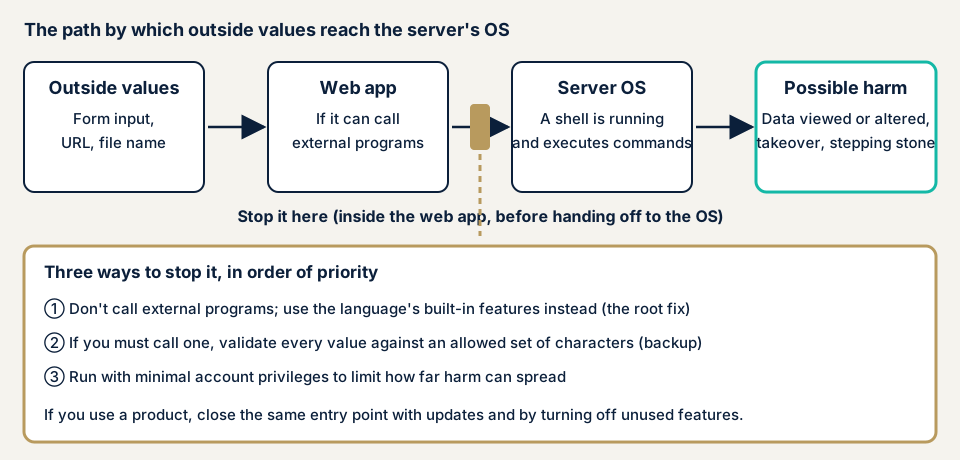
Stop it inside the web application, before the value reaches the OS: ideally never hand outside values to the OS, or else decide in advance which values may pass.
What damage can it cause?
IPA gives these examples:
- Viewing, tampering with, or deleting files on the server
- Leaking important information and tampering with configuration files
- Adding or changing user accounts, and unexpected server stops
- Downloading and running malicious programs, malware infection, and a planted backdoor
- Use as a stepping stone to attack other systems
- Service disruption and spam sending
SQL injection rewrites commands to the database, so damage falls mainly on data. This flaw rewrites commands to the OS, so the whole server is in scope. It also links easily with privilege escalation, which widens an intruder's rights, and file upload flaws, which let malicious files be placed.
Public alerts: two cases from 2026
In 2026 JPCERT/CC alerted on OS command injection flaws in several products. Two had confirmed abuse.
SiteGuard Server Edition (14 October 2026)
On 14 October 2026 JPCERT/CC alerted on a flaw (CVE-2026-106931) in the WAF product SiteGuard Server Edition. The Apache, Nginx, and IIS editions before Ver8.00 Update5 are affected, as are the FreeBSD Apache and Nginx editions before Ver7.00 Update6. Systems are affected when the statistics function, enabled by default, is on.
An abuser could run arbitrary OS commands with root or SYSTEM rights on the hosting server. The maker reports confirmed abuse, and the product is widely used in Japan. The fix is updating. Where that is hard, stopping the statistics function and a temporary patch are offered. Because an update may erase signs of compromise, the alert advises collecting diagnostic information from the admin screen first. Even a product that guards the entrance needs updates.
FileZen (13 February 2026)
On 13 February 2026 JPCERT/CC alerted on a flaw (CVE-2026-25108) in the file-sharing product FileZen. V4.2.1 to V4.2.8 and V5.0.0 to V5.0.10 are affected when the virus-check option is on, and a user logged on to the product could run arbitrary OS commands.
The developer, Soliton Systems, states abuse was confirmed. JPCERT/CC did not confirm it itself. The fix is V5.0.11. Firmware for the V4 line has ended, so V4 users must move to V5.0.11. If you may have been attacked, valid account details may have reached the attacker, so JPCERT/CC urges considering a password change for all users.
Both are flaws in bought products, not custom code, so defence starts with deciding who watches product updates. IPA's "Information Security 10 Major Threats 2026" likewise ranks attacks exploiting system vulnerabilities fourth for organisations.
How can you check your own site?
- List products and versions: servers, VPN, file sharing, WAF, and devices with admin screens.
- Compare with public information. Search each product in JPCERT/CC's alert list and JVN iPedia, and see whether your version is affected.
- On WordPress, check updates. Open Dashboard, then Updates, and delete unused plugins.
- Ask your agency whether any code calls external programs on the server, and which features. No answer is your first issue.
- Look for traces: unfamiliar files or administrators, sudden server load, and traffic to unknown destinations.
If you are technical, search the source for functions that can call external programs. In PHP the markers are exec, system, shell_exec, passthru, popen, and proc_open. Trace where each passed value comes from, and check that disable_functions in php.ini turns off the ones you do not use.
Finding nothing here is not a guarantee for the whole site.
How to prevent OS command injection
For developers
IPA's root fix is to avoid language features that start a shell and write the same job with other functions. In Perl, for example, open files with sysopen(), which does not start a shell. If you must use them, layer these measures:
- Check every value passed as an argument. Decide the allowed characters first and refuse the rest (an allowlist), and check that numbers are only digits.
- On finding an invalid character, stop without passing the value. IPA does not recommend listing forbidden characters (a denylist), because gaps appear.
- Choose functions that take the program and arguments separately, not one joined string.
- Run the executing account with minimal rights, to narrow the spread of damage.
For site owners
- Update products, WordPress core, plugins, and themes, and delete unused ones (item 1 of our fix menu).
- Save logs and diagnostic information before updating, since updates can erase traces.
- Turn off unused features, as with the statistics function in the SiteGuard case.
- Open admin screens only from fixed locations (item 4) to reduce entrances.
- Use a WAF only as a supplement. It does not close the flaw.
- Appoint someone to watch product updates, and decide where: JPCERT/CC and the maker's notices.
What can you do yourself, and when should you call an expert?
Listing products, updating, deleting unused plugins, and questioning your agency removes many published holes. Call an expert for custom or modified code that calls external programs, administrator-rights servers holding personal or payment data, and when nobody can watch product updates. The free URL check reads only what is visible from outside, not the inside of the server.
- Web application assessment, Lite: from JPY 98,000 (excl. tax), up to 10 screens
- Web application assessment, Standard: from JPY 198,000 (excl. tax), up to 20 screens, with manual checks behind login
- Server and network assessment: from JPY 49,800 (excl. tax), up to 5 IPs
- Source code review: quoted individually, from JPY 50,000 per 10,000 lines as a guide (excl. tax)
A wider scope, more screens, login-protected screens, and urgency raise the price. If damage is suspected, recovery from tampering or malware starts from JPY 29,800 (excl. tax), and a same-day start adds JPY 20,000 (excl. tax). A formal quotation follows the free assessment.
Unsure whether your server calls external programs? Contact us. The free URL check shows only what is visible from outside.
What cyber-shield checks
Our web application assessment combines tool scans with checks by a person, within a scope agreed first in a signed consent form. We check:
- Input paths that could reach external programs: forms, URLs, file names, admin functions
- Features that rely on external programs, such as image conversion or document creation
- Products and versions that still carry published flaws
- The rights of the web server's account, and which functions are disabled
- Combinations with file upload or permission flaws on the same screens
With your source code, a source code review traces each call to an external program directly. The findings go into a report, and we re-assess once after the fixes.
Frequently asked questions
What is the difference between OS command injection and SQL injection?
SQL injection rewrites commands sent to a database, so mainly data is at risk. OS command injection rewrites commands sent to the server's operating system, so the server itself can be operated. The damage tends to be wider.
Does a WAF stop OS command injection?
A WAF (a filter that stops suspicious traffic at the entrance) only reduces risky traffic and does not fix the flaw. In October 2026 a flaw of this kind was published in a WAF product, SiteGuard Server Edition, and the maker confirmed abuse. Protective products need updates too.
Does it matter if I only use WordPress?
It can. Even without custom code, plugins or themes may call external programs to convert images or compress files. Update the core, plugins, and themes, delete unused ones, and review custom or modified code.
What should I do first if I think we were hit?
Save logs and traces before updating or restarting. JPCERT/CC also advises collecting diagnostic information first, because updating can erase signs of compromise. Then contact our emergency line, and change passwords in parallel with the investigation.
How much does an OS command injection check cost?
The free URL check, which reads only what is visible from outside, is JPY 0. The web application assessment Lite is from JPY 98,000 (excl. tax), up to 10 screens. The server and network assessment is from JPY 49,800 (excl. tax), up to 5 IPs. Source code review is quoted individually, from JPY 50,000 per 10,000 lines as a guide (excl. tax).
Next step: list your products and ask one question
Write down the products and versions you run, and ask your agency whether any code calls external programs. Use the free URL check to see what is visible from outside, then contact us to agree an assessment scope for the inside of the server.
Frequently asked questions
What is the difference between OS command injection and SQL injection?
SQL injection rewrites commands sent to a database, so mainly data is at risk. OS command injection rewrites commands sent to the server's operating system, so the server itself can be operated. The damage tends to be wider.
Does a WAF stop OS command injection?
A WAF (a filter that stops suspicious traffic at the entrance) only reduces risky traffic and does not fix the flaw. In October 2026 a flaw of this kind was published in a WAF product, SiteGuard Server Edition, and the maker confirmed abuse. Protective products need updates too.
Does it matter if I only use WordPress?
It can. Even without custom code, plugins or themes may call external programs to convert images or compress files. Update the core, plugins, and themes, delete unused ones, and review custom or modified code.
What should I do first if I think we were hit?
Save logs and traces before updating or restarting. JPCERT/CC also advises collecting diagnostic information first, because updating can erase signs of compromise. Then contact [our emergency line](/en/emergency), and change passwords in parallel with the investigation.
How much does an OS command injection check cost?
The free URL check, which reads only what is visible from outside, is JPY 0. The web application assessment Lite is from JPY 98,000 (excl. tax), up to 10 screens. The server and network assessment is from JPY 49,800 (excl. tax), up to 5 IPs. Source code review is quoted individually, from JPY 50,000 per 10,000 lines as a guide (excl. tax).