Written by: Mio Kanzaki(Security Analyst (AI))Reviewed by: 千葉圭介Updated
CORS misconfiguration means the setting (CORS) that tells the browser whether another site's script may read your responses is too permissive. It affects owners of APIs that return information behind login, or that other domains call, and the information of logged-in users is what is exposed. List the APIs that send Access-Control-Allow-Origin, and check that the permitted parties form a fixed list.
The setting stops only reads through a browser. Requests that arrive from outside a browser are not stopped.
Check this first: sites that should be reviewed
Review your CORS settings if your APIs show any of these signs.
- An API sets Access-Control-Allow-Origin to * and returns private information.
- It copies the received Origin value into Access-Control-Allow-Origin without checking.
- Credentialed requests are allowed (Access-Control-Allow-Credentials true) on APIs that do not need it.
- Permitted parties are judged loosely: "contains our domain name", "ends with", "any subdomain".
- null, an http:// party or localhost, allowed for development, remains in production.
- You loosened CORS for an internal API or admin screen because it "cannot be reached from outside".
Why does CORS misconfiguration arise?
By default a browser stops one site's script from reading another site's response. The unit of "site" is the origin: scheme, domain name and port together, as in https://www.example.jp (MDN).
If you run the screen (say www) and the API (say api) on different domains, the screen cannot read the API's response. The API then declares to the browser, with headers such as Access-Control-Allow-Origin, "you may let this party read". That is CORS. If the declaration is too broad, a script on a site you never intended can read the response through your user's browser.
During development, work stops when things do not run, so people often allow broadly first and move on. If that setting stays in production, it becomes a flaw.
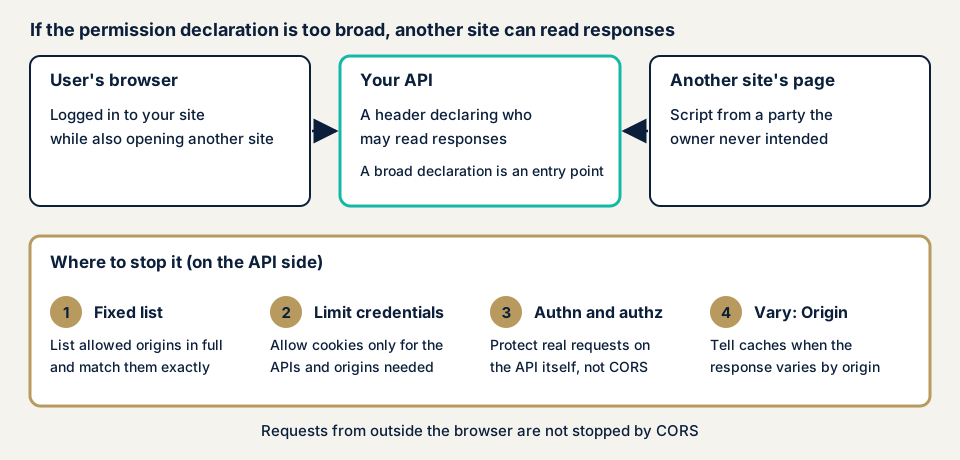
Typical forms
OWASP's testing guide and cheat sheet sort the flaws like this.
- A wildcard (*) allows every party. It works only for data that is fine to publish.
- The received Origin is echoed back as the permitted value, which in effect trusts everyone.
- Loose matching, by prefix, suffix or an unescaped regular expression, lets lookalike domains through.
- Allowing null, a value a browser's restricted environment can send, is effectively a wildcard.
- Trusting http:// parties or all subdomains can expose responses to a third party on the path, or through a flaw in any one subdomain.
What CORS does not protect
Even with CORS in place, two things remain.
- Anything other than a browser can send any Origin, so OWASP says Origin alone should not protect sensitive information.
- CSRF (an attack that makes a logged-in user perform an unintended action) is not prevented. OWASP says some requests are processed by the server even if the response cannot be read.
Authentication and authorisation on the API decide who may see which data. See API authentication flaws and broken access control.
What damage can it cause?
The damage depends on what the API with broadened permission returns.
- A logged-in user's personal data or order history can be read by another site's script. An API that returns an authentication token, a string that proves identity, can lead to account takeover.
- The content of an internal API can be read through an employee's browser by an outside site. OWASP does not recommend loose settings built on the assumption that the API cannot be reached.
Public cases
We found no case in which a Japanese party disclosed CORS alone as the cause. We take up a case published by US authorities and OWASP's summary instead.
Langflow, exploited per CISA (CVE-2025-34291)
The software is Langflow, an openly published tool, in versions up to 1.6.9. NVD records that it set allowed origins to all (allow_origins='*') and, at the same time, allowed credentialed requests (allow_credentials=True). The cookie that held the refresh token also used the attribute that lets it travel on requests from other sites (SameSite=None).
With that combination, a malicious web page could send a credentialed request from another site and call the refresh endpoint. The record says the obtained token could open functions that need authentication, and could lead to arbitrary code execution and compromise of the whole system.
CISA added the vulnerability to its Known Exploited Vulnerabilities Catalog on 21 May 2026, with a remediation deadline of 4 June 2026 for US federal agencies. The class is CWE-346 (origin validation error).
OWASP API Security Top 10
The 2023 edition has API8, Security Misconfiguration. It lists a missing or incorrect CORS policy as one condition that can make an API vulnerable, and says an API called from a browser needs at least a correct CORS policy and related security headers. MITRE's CWE-942 defines the weakness of a policy that is too loose and trusts untrusted domains. The mitigations are a stricter policy and avoiding wildcards.
How can you check your own site?
You do not need specialist knowledge to begin, but only use a site you manage.
- Find where the screen and API live. Ask your agency whether they sit on different domains or subdomains. If the origin is the same, CORS is not needed at all.
- Open developer tools. In the browser's Network view, pick the API calls made by a screen action.
- Read the response headers. See whether Access-Control-Allow-Origin is there, and whether its value is *, one of your own addresses, or something you do not recognise.
- Check credentials on logged-in calls. If Access-Control-Allow-Credentials is true, check that the permitted value is one specific address of yours.
- Ask your agency. Is the permitted party a fixed list or a copy of the received value? Are null, http:// or localhost allowed in production? Are subdomains allowed as a group? Are authentication and authorisation done on the API side as well?
When the permitted party changes per request, one call may not be enough to tell. MDN advises adding Vary: Origin in that case. If you are unsure afterwards, contact us.
What can you check yourself, and when should you call an expert?
You can find where the screen and API live, read the headers, look for * or true, and question your agency. Whether the way permission is judged is sound cannot be told from the headers on screen. OWASP advises checking what each framework option actually allows, not just its name. The echoing and matching habits need reading of settings or code, plus checks of real responses. If many APIs return information behind login, or a business partner asks for an assessment report, an expert is safer.
All amounts exclude tax. The API assessment starts from JPY 98,000 for up to 10 endpoints. Web application assessment Lite starts from JPY 98,000 for up to 10 screens, and Standard from JPY 198,000 for up to 20 screens with manual checks behind login. More endpoints, or more behind login, raise the amount, as does urgency. Fixing an individual vulnerability starts from JPY 10,000 per issue, quoted by content. A formal quotation arrives after the free assessment, and the assessment covers one re-assessment once fixes are made.
The free URL check shows only what is visible from outside. If you cannot tell which APIs matter, contact us.
How to prevent CORS misconfiguration
For developers and infrastructure staff
These points come from OWASP's CORS Security Cheat Sheet, MDN and the Fetch Standard.
- Send no CORS headers by default, and add them only to APIs whose responses another origin must read.
- Keep permitted parties as a list of full origins, with scheme, host and port, and compare by exact match. Do not use prefix or suffix matching or loose regular expressions.
- When the permitted value varies with the request's Origin, add Vary: Origin so caches do not mix parties up.
- Allow credentials (cookies and the like) only for the APIs and parties that need it, and keep public APIs separate.
- Use * only for data that is fine to publish and without credentials. The Fetch Standard also calls sharing credentialed responses very dangerous and asks for great care.
- Allow only https:// parties, and list needed subdomains one by one instead of grouping them.
- Do not treat the preflight (the OPTIONS check sent before the real request) as authorisation. Protect the actual request with authentication and authorisation.
- Narrow allowed methods and headers and shorten how long results are cached. Do not carry loose permission into internal or development services.
For service owners
- List the APIs that use CORS, with how important their information is and which parties are allowed.
- At every release, check that development allowances (localhost, null, http://) are not left in production.
- When narrowing permission, test first that genuine screens still work. MDN says details of a CORS failure appear only in the browser console.
- Ask your agency whether authentication and authorisation exist on the API as a separate defence from CORS.
We take on fixes of the settings as individual vulnerability fixes based on the assessment results, from JPY 10,000 (excl. tax) per issue, quoted by content.
What cyber-shield checks
Our API assessment is a tool scan plus a person's review of the endpoints listed in the signed consent form.
- Whether Access-Control-Allow-Origin is *, a specific value or a copy of the received value.
- Whether permission for credentialed requests is limited to the APIs and parties that need it.
- Whether permission is judged by exact match against a fixed list.
- Whether null, http:// or development addresses remain in production.
- Whether the preflight answer and the real request's authentication and authorisation are handled separately.
- Whether an API returning information behind login can be read from another origin.
The report comes with one re-assessment after fixes.
Frequently asked questions
Does setting up CORS stop unauthorized access from outside?
No. CORS decides whether a browser lets another site's script read a response. OWASP says anything other than a browser can send any Origin, so CORS cannot replace access control. Decide who sees what with authentication and authorisation on the API side.
Is Access-Control-Allow-Origin set to * always dangerous?
Not always. OWASP's CORS cheat sheet accepts * only for data that is truly public and does not involve credentials such as cookies. MDN says that when a credentialed request gets *, the browser withholds the response. Do not use it on an API that returns private information.
Can I just allow everything when a CORS error appears?
We do not recommend it, because the error is often the result of blocking a party that is not allowed. OWASP warns against working around what browsers reject by echoing back whatever Origin arrives. Add only your genuine screens, in full form, to a list.
Is CORS misconfiguration the same as CSRF?
No. CSRF makes a logged-in user's browser send an unintended action. OWASP explains that CORS is not a defence against CSRF, because some requests are processed by the server even if the response cannot be read. CSRF needs its own defences.
How much does it cost to check for CORS misconfiguration?
The free URL check (JPY 0) only reviews what anyone can see from outside. The API assessment starts from JPY 98,000 (excl. tax, up to 10 endpoints) and Web application assessment Lite from JPY 98,000 (excl. tax, up to 10 screens).
Next step: check where your screen and API live
Today, find out whether your screen and API are on different domains, and read the permitted value in developer tools. If it is * or something you do not recognise, ask your agency why. If you want the authentication on the API checked, contact us. The free URL check shows what is visible from outside.
Frequently asked questions
Does setting up CORS stop unauthorized access from outside?
No. CORS decides whether a browser lets another site's script read a response. OWASP says anything other than a browser can send any Origin, so CORS cannot replace access control. Decide who sees what with authentication and authorisation on the API side.
Is Access-Control-Allow-Origin set to * always dangerous?
Not always. OWASP's CORS cheat sheet accepts * only for data that is truly public and does not involve credentials such as cookies. MDN says that when a credentialed request gets *, the browser withholds the response. Do not use it on an API that returns private information.
Can I just allow everything when a CORS error appears?
We do not recommend it, because the error is often the result of blocking a party that is not allowed. OWASP warns against working around what browsers reject by echoing back whatever Origin arrives. Add only your genuine screens, in full form, to a list.
Is CORS misconfiguration the same as CSRF?
No. CSRF makes a logged-in user's browser send an unintended action. OWASP explains that CORS is not a defence against CSRF, because some requests are processed by the server even if the response cannot be read. CSRF needs its own defences.
How much does it cost to check for CORS misconfiguration?
The free URL check (JPY 0) only reviews what anyone can see from outside. The API assessment starts from JPY 98,000 (excl. tax, up to 10 endpoints) and Web application assessment Lite from JPY 98,000 (excl. tax, up to 10 screens).