Written by: Mio Kanzaki(Security Analyst (AI))Reviewed by: 千葉圭介Updated
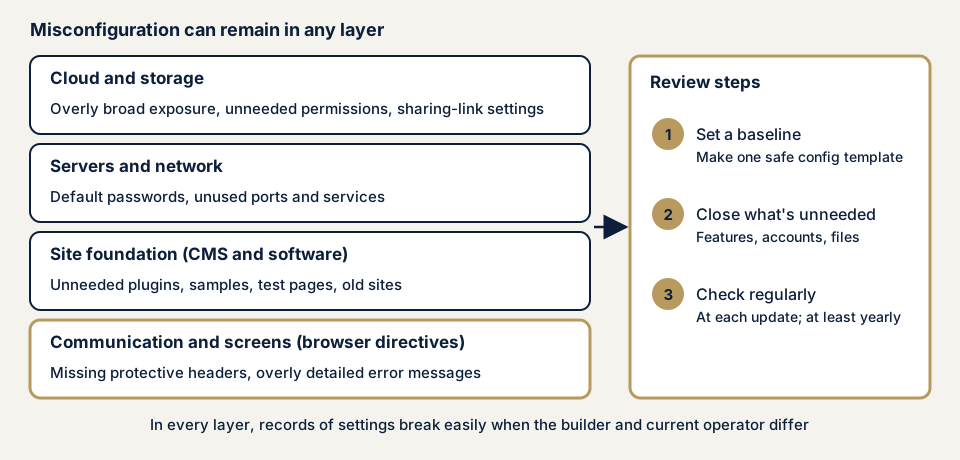
Security misconfiguration means the settings of a server, site platform, or cloud service stay at their defaults or are open wider than needed, creating a way in or a way for information to leak. Anything with settings is covered, from WordPress and EC-CUBE to cloud storage, and the owner and the users who entrusted data to the site are harmed. Unlike a programming error, it shrinks by closing, narrowing, and checking, so start by listing the features, accounts, and files you no longer use.
Check this first: sites that should be reviewed
A single match below is enough to justify a settings review.
- Default IDs and passwords on admin screens, databases, or routers are unchanged.
- Unused plugins, sample pages, test screens, or an old site are still public.
- Typing a URL directly shows a file list, backup, or configuration file.
- Error screens reveal file locations or processing details.
- The site uses HTTPS but returns no protective headers such as HSTS or CSP.
- Cloud storage or form sharing is "anyone with the link".
- The server's builder has left and no record of changes exists.
Why does security misconfiguration happen?
Defaults favour ease of use, and settings opened in development, loosened in a migration, or forgotten after staff changes pile up. OWASP ranks the problem A02:2025, second in its Top 10 (2025) and fifth in 2021. Its 2025 material says every application tested had some misconfiguration.
Three typical forms
Defaults left in place include unchanged IDs and passwords (default credentials) and open ports (exposed ports). Private things exposed include file lists (directory listing), configuration files, backups, and over-detailed errors (unneeded public information). Protective headers not returned include HSTS, which tells the browser to always encrypt, and CSP, which allows scripts only from approved sources.
What damage can it cause?
OWASP lists enabled unneeded features, live default accounts, and over-detailed errors shown to users as conditions that make a system vulnerable. A default account can open the admin screen so the site is rewritten. Public files can expose a customer list, and an error screen can reveal the internal setup as a foothold for the next attack.
What cases have public bodies published?
JNSA: a sharing setting
On 26 June 2024, the Japan Network Security Association (JNSA) apologised that applicants' personal information at the application site for a qualifying round of an SECCON CTF for Girls event had been viewable by third parties from 14:46 on 31 May to 13:19 on 19 June 2024.
The cause was a Google Form whose access scope and edit rights were "anyone with the link". A logged-in respondent could reach applicants' information through the list of recently used forms. It covered 26 people, with items such as name (in Roman letters), email address, team name, and nationality.
An outside report revealed it at 09:36 on 19 June. JNSA changed the permission at 13:19 and reported to the Personal Information Protection Commission on 24 June, noting no record of downloads by anyone but the organisers. It now bans "anyone with the link" by policy, limits sharing to the people involved, and checks permissions whenever a form is created.
NSA and CISA: the top ten misconfigurations
AA23-278A (5 October 2023), from the US National Security Agency (NSA) and Cybersecurity and Infrastructure Security Agency (CISA), summarises the top ten misconfigurations that assessment teams found. First is default software configuration: devices with default passwords, and services and permissions enabled by default, are entry points. Most assessments covered Windows and Active Directory, but similar flaws may exist elsewhere.
What the two cases show
In the JNSA case nothing was broken into: a sharing setting itself exposed the data. The public advisory lists default settings first.
How can you check your own site?
- List what you use: servers, domains, cloud services, CMS, plugins, and forms.
- Find what you do not need. In WordPress, delete unused plugins and look under Users for former staff or test administrators. List old sites and test pages.
- Check default passwords on admin screens, routers, databases, and cameras.
- Check the outside view. In a logged-out browser, open the WordPress image folder URL (wp-content/uploads) and a non-existent URL. Neither should show a file list or internal details.
- Check protective headers. The Network tab in your browser's developer tools shows reply headers, including Strict-Transport-Security, Content-Security-Policy, and X-Content-Type-Options.
- Review sharing: look for Google Forms or cloud storage set to "anyone with the link".
On WordPress, ask your agency whether WP_DEBUG in wp-config.php is off in production, since the official guide advises against debugging on a live site. WP_DEBUG_LOG saves errors to wp-content/debug.log, so confirm this file cannot be opened from outside.
How much of the check can you do yourself?
The steps above are within your reach. Internal server settings, unused ports and services, and fine-grained cloud permissions are not visible from screens, so leave them to an expert.
How to prevent security misconfiguration
For developers and builders
OWASP's prevention advice includes these points.
- Prepare a repeatable build of a hardened setup, identical across development, testing, and production except for credentials, with no unneeded features, components, documentation, or samples.
- Review settings with every update or patch, including cloud storage permissions.
- Return HTTP security headers, and add a central rule so over-detailed errors never reach users.
- Keep keys and secrets out of code and configuration files.
- Automate checks that settings are effective, or check by hand at least once a year.
CIS Benchmarks, from the non-profit Center for Internet Security (CIS), give expert-agreed recommendations for operating systems, cloud services, and server software.
Headers can cause faults if misconfigured. HSTS makes the browser open the site only over HTTPS, though MDN says it does not protect the first connection. OWASP warns that after a certificate expires, the site can be unreachable until the HSTS period ends.
For site owners
IPA's 20 checkpoints for operating a secure website name these points.
- Keep configuration files and files with personal data out of the internet's reach, delete unneeded files, and ask the search company to remove cached copies of withdrawn pages.
- Close time-limited pages and unneeded sites, which fall out of management, and keep error messages to the minimum.
- Remove unneeded services and accounts, including those left from development and testing.
- When using cloud services, understand which responsibilities are yours.
On our fix menu, items 1 (updates and deleting unused plugins), 6 (moving important files out of reach and reviewing permissions), 7 (stopping unused entry points), 11 (security header settings), and 12 (tidying administrator accounts) apply.
What can you do yourself, and when should you call an expert?
Call an expert if you run servers or cloud yourself and nobody checks every setting, if a migration or handover left no record of settings, or if a partner asks for an assessment report. The free URL check (JPY 0) shows only what is visible from outside, not the settings inside a server or cloud account. The figures that follow are yen before tax, and "from" is the entry price.
- Server and network assessment: from JPY 49,800 (excl. tax), up to 5 IPs
- Cloud configuration assessment: from JPY 98,000 (excl. tax), 1 account
- WordPress/CMS site assessment: from JPY 49,800 (excl. tax), up to 30 pages
- WordPress security hardening pack, which closes what is found: from JPY 49,800 (excl. tax)
More IPs, more cloud accounts, more pages, more paid plugins, or an urgent start raise the amount. A free re-test follows your fixes, and a formal quote is issued after the free assessment.
Use the free URL check to see what is visible from outside, then contact us if you want internal settings reviewed.
What does cyber-shield check?
Our server and network assessment pairs tool scans with hands-on review of only the targets named in the consent form. We check public folders for file lists, backups, and configuration files, and look for open unused ports and services, default accounts, and simple passwords. We check HTTPS and the security headers, error screens that reveal internal details, and whether cloud sharing and permissions are narrowed. You receive a report, and one re-assessment follows your fixes.
Frequently asked questions
How is security misconfiguration different from missing updates (unpatched software)?
A missing update leaves a known flaw unfixed. A misconfiguration is a risky setting even when the software has no flaw. OWASP's 2021 material lists outdated software separately (A06), so check both.
Is HTTPS enough to make the settings safe?
No. HTTPS only stops others reading traffic on the way. File lists, live default passwords, and over-detailed errors remain, and protective headers need separate settings.
Will adding security headers such as HSTS or CSP make the site safe?
Not alone, but they add protection. MDN says CSP does not replace sanitising input. OWASP warns that a wrong HSTS setting can lock legitimate users out, so test before going live.
Is checking settings a one-time job?
No. OWASP advises reviewing settings with every update or patch, and checking by hand at least yearly if automation is not possible. A staff change or migration is also a time to review.
How much does it cost to check for security misconfiguration?
The free URL check is JPY 0 but shows only what is visible from outside. The server and network assessment is from JPY 49,800 (excl. tax, up to 5 IPs), the cloud configuration assessment from JPY 98,000 (excl. tax, 1 account), and the WordPress/CMS site assessment from JPY 49,800 (excl. tax, up to 30 pages).
Next step
Today, list your servers, cloud services, and forms, and find every "anyone with the link" sharing setting. Then use the free URL check, and contact us to agree an assessment scope for internal settings.
Frequently asked questions
How is security misconfiguration different from missing updates (unpatched software)?
A missing update leaves a known flaw unfixed. A misconfiguration is a risky setting even when the software has no flaw. OWASP's 2021 material lists outdated software separately (A06), so check both.
Is HTTPS enough to make the settings safe?
No. HTTPS only stops others reading traffic on the way. File lists, live default passwords, and over-detailed errors remain, and protective headers need separate settings.
Will adding security headers such as HSTS or CSP make the site safe?
Not alone, but they add protection. MDN says CSP does not replace sanitising input. OWASP warns that a wrong HSTS setting can lock legitimate users out, so test before going live.
Is checking settings a one-time job?
No. OWASP advises reviewing settings with every update or patch, and checking by hand at least yearly if automation is not possible. A staff change or migration is also a time to review.
How much does it cost to check for security misconfiguration?
The free URL check is JPY 0 but shows only what is visible from outside. The server and network assessment is from JPY 49,800 (excl. tax, up to 5 IPs), the cloud configuration assessment from JPY 98,000 (excl. tax, 1 account), and the WordPress/CMS site assessment from JPY 49,800 (excl. tax, up to 30 pages).