Written by: Mio Kanzaki(Security Analyst (AI))Reviewed by: 千葉圭介Updated
Information disclosure from unneeded public content means information that visitors do not need to see can be seen from outside. Every company with a site is exposed, and sites whose operation is left wholly to outsiders often keep error details, configuration files, old backups and unused old sites in view. Open your site from a connection outside your company and see how it looks from outside. If you already know personal data is visible, read our emergency guide first.
Check this first: sites that should be reviewed
Review what you make public if your site shows any of these things.
- A missing page or a fault shows file locations on the server or internal program text on screen.
- A public folder holds old backups, copies of configuration files, or files named "test" or "old".
- An old campaign site, former site or test site is still public.
- Member or applicant lists are passed around through cloud storage or share links.
- A live WordPress site has the debug setting (WP_DEBUG) on.
- A file you made private still appears in search results.
- Nobody decides which information may be shown outside, and no rule checks it.
IPA's 20-item guide to safe website operation covers this area in four items: item 1 on files that should not be public, item 2 on closing pages and sites no longer needed, item 5 on unnecessary error messages, and item 13 on access control for files and directories.
How does information become visible from outside?
MITRE's CWE-200 defines the weakness as exposing sensitive information to someone not authorised. There are several causes, so it helps to sort them by how they appear.
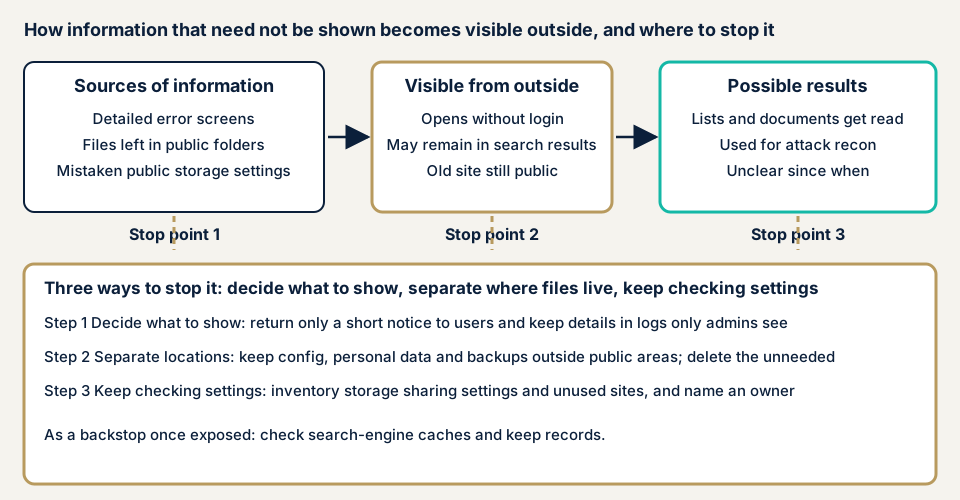
The first is screen output. When a system reaches an unexpected state and returns detailed developer text to users, the type and version of the server and software and file locations show. OWASP's error handling guide says attackers first collect such technical clues, and unhandled errors hand them over.
The second is where things are kept. If configuration files, personal data files or backups sit where the internet can reach them, anyone who learns the location can fetch them. CWE-538 describes this kind of weakness. An unused old site is the same, since old components stay without anyone watching (IPA item 2).
The third is permission settings. Cloud storage and share links switch between public and private by settings. After one mistake, nothing changes on screen, yet anyone who knows the location can open the file.
What damage can it cause?
The damage takes two forms. One is that the information itself is read, such as lists or images of documents. Both cases below were of this kind.
The other is use for reconnaissance. Once the type and version of software are known, weaknesses published for that version can be targeted. Here the damage may not show at once and appears later as another attack.
How it relates to other flaws
A folder whose contents show as a list is directory listing, and settings gaps in general are in security misconfiguration. The defences overlap with those pages.
Cases disclosed by the operators and public bodies
HANOWA (October 2026)
On 19 October 2026 HANOWA, which runs the HANOWA recruitment matching service, disclosed that images of personal information and submitted documents held in cloud storage had been viewable. Its access restriction settings were inappropriate. It says the images did not show on normal screens and viewing needed technical knowledge.
Up to 49,309 people were affected. Documents submitted by up to 10,311 people, such as driving licences and account verification documents, were involved. They had been submitted between June 2019 and December 2025. From June 2019 to 17 June 2020 other logged-in users could see them, and from 18 June 2020 to 16 October 2026 third parties who were not logged in could too.
An internal check on 14 October 2026 found it. The setting was fixed by the morning of 15 October and the document images deleted on 16 October. No access records exist, so actual viewing cannot be confirmed, and the company treats it as a possible leak. The causes it names are no mechanism for checking settings, old data kept undeleted, and some images stored without restriction.
Nikkei Inc. (June 2023)
On 15 June 2023 Nikkei Inc. disclosed that personal information of 3,763 applicants to a web seminar had been viewable from the internet. It included names, email addresses, phone numbers, addresses, dates of birth, annual income and financial assets, and for some people bank account numbers.
It lasted two weeks, from 11 to 24 May 2023. An administrator of the delivery system had wrongly changed a file setting from private to public during improvement work. It came to light on 24 May through a web patrol by a person involved with the webinar, and outside access was stopped at once and the file deleted. Nikkei says a security company's investigation found no outside access. It sent notices to the 3,763 people and reported to the Personal Information Protection Commission.
What the authorities' report shows
The report published on 12 March 2026 by the National Public Safety Commission and two ministers classifies causes of unauthorized access reported to IPA. Of 89 causes counted from 85 reports of actual damage, "configuration flaws" (including insecure default settings) were 7.
The same report says reports of reconnaissance, such as probing for account names, numbered 0 in 2025, and notes that these figures do not represent actual occurrence. Public information used for reconnaissance is damage that is hard to notice.
How can you check your own site?
This needs no specialist knowledge, only a site you manage.
- Open your site from a line outside your company. On a phone's mobile data, open an address that does not exist. See whether you get only a short notice such as "page not found", or file locations and internal text.
- Search your domain. In Google, type "site:" followed by your domain. Google says this does not always list every page. Look for lists, quotations or old campaign titles that should not appear.
- Look inside public folders. Use your host's file manager or FTP. Folder names differ by server. Look for backups, archives, lists and files named "test" or "old".
- Check WordPress settings. In wp-config.php, see that WP_DEBUG is not true. If you cannot read it, ask your agency.
- List unused sites and storage. In the domain management screen, list everything including subdomains. In cloud storage and share links, check in each service's sharing settings that nothing opens without login.
- Ask your agency. Are errors shown to users kept minimal? Where are detailed records kept, and can they be opened from outside? Who reviews public and private settings, and when?
What you checked is all this covers, and it does not vouch for the rest. If this is too much, contact us.
How far can you go yourself?
Looking at the outside view, inventorying public folders, listing unused sites and questioning your agency are within reach. The finer points of cloud permissions, and working out since when something was visible, mean following settings and records one by one.
How to prevent information disclosure
Those who build the site (agencies, developers) and those who run it have different tasks. OWASP and IPA give three rules: show users the minimum, keep important files outside the public area, and leave nothing unused behind.
For agencies and developers
- For unexpected errors, return only a short notice to users and write detail to a log only administrators can read. OWASP's guide shows a common handler that catches everything.
- Enable detailed developer error screens only in the development environment. Treat 5xx errors as something to monitor, since they can signal failure on particular input.
- Keep configuration and personal data files apart from public files, somewhere the internet cannot reach, and delete files you do not need (IPA item 1).
- On WordPress, do not use WP_DEBUG on a live site. If you must, set WP_DEBUG_DISPLAY to false so output goes to a log, not the screen, and check the log file cannot be opened from outside.
- Make wp-config.php readable only by its user and the web server. WordPress.org gives 400 or 440 as a guide.
- Remove unused features and samples, and repeat configuration checks automatically (OWASP A05).
For site owners
- Make a list of what may be public and name who decides. Review public and private settings by a set date.
- Delete lists and documents after a retention period. In the HANOWA case, old data left in place was one cause.
- Close sites and pages you do not use, as IPA item 2 advises for sites you cannot manage.
- Delete unused plugins when you update (item 1 of our fix menu).
- Move key files such as configuration where they cannot be read from outside, and review permissions (item 6).
- Set up encryption and security headers (item 11), and keep daily backups outside the public area (item 10).
What if information was already visible from outside?
If you find that lists or documents were visible from outside, first stop them being visible. Switch public settings to private, or move the files outside the public area. Before that, record the screen and the settings with the date and time.
Then check the search engine's cache, since IPA says files can be viewed from the cache even when private. HANOWA and Nikkei both say they reported to the Personal Information Protection Commission. Whether a report or notice to the people concerned is needed depends on the type and number of items that may have leaked, so tell us your situation through our emergency contact.
When should you call an expert, and what does it cost?
Call an expert if you handle member lists or ID documents, if nobody can explain the whole site's public settings, or if you have learned that something was visible from outside. The free URL check (JPY 0) shows only what is visible from outside, not screens or settings behind login.
All amounts exclude tax. The server and network assessment starts from JPY 49,800 for up to 5 IPs, and the WordPress/CMS site assessment from JPY 49,800 for up to 30 pages. Web application assessment Lite starts from JPY 98,000 for up to 10 screens. Fixing an individual vulnerability starts from JPY 10,000 per issue.
Scope, whether screens behind login are included, paid plugins and urgency set the final amount. One re-assessment after fixes is included. For continuing care, Maintenance Lite is JPY 9,800 per month (excl. tax), including daily backups, tamper monitoring and a monthly report. The formal quotation follows the free assessment.
The free URL check shows what is visible from outside. If you are unsure how far to go, contact us.
What cyber-shield checks
Our platform assessment combines a tool scan with a person's review, in the range set by the consent form first. Nothing we run amounts to an attack.
- Whether error screens visible from outside show file locations or software versions.
- Whether public folders hold backups or copies of configuration files.
- Whether unused pages, old sites or test sites are still public.
- Whether debug settings are on, and whether log files can be fetched from outside.
The report ranks the fixes, and repair work starts after you accept the quotation.
Frequently asked questions
Does hiding error messages prevent information leaks?
Only partly. IPA's operations guide asks you to keep error message content to the minimum. But files left in a public folder, or public settings on cloud storage, are separate from error screens. Check three things apart: what you show, where files are kept, and how settings are made.
Does a file become invisible to everyone as soon as I make it private?
Not always. IPA's operations guide says a file made private can remain in a search engine's cache and still be viewed. In that case, ask the search engine's operator to delete the cache.
Should WordPress debug settings never be used on a live site?
WordPress.org does not recommend using WP_DEBUG and similar debugging on a live site. If you must, there is a setting that stops screen output and writes to a log only. Check separately that the log's location cannot be opened from outside.
How much does it cost to check for needlessly public information?
The free URL check (JPY 0) shows only what is visible from outside, not screens or settings behind login. The server and network assessment starts from JPY 49,800 (excl. tax, up to 5 IPs), and the WordPress/CMS site assessment from JPY 49,800 (excl. tax, up to 30 pages). An individual vulnerability fix starts from JPY 10,000 (excl. tax) per issue, quoted by content.
Next step: see your site from outside
Today, open your site on a phone's mobile data, enter an address that does not exist, and read what appears. Then search your domain with "site:" and look for titles that should not show. To have public folders and cloud settings checked, contact us to agree an assessment scope. The free URL check shows what is visible from outside.
Frequently asked questions
Does hiding error messages prevent information leaks?
Only partly. IPA's operations guide asks you to keep error message content to the minimum. But files left in a public folder, or public settings on cloud storage, are separate from error screens. Check three things apart: what you show, where files are kept, and how settings are made.
Does a file become invisible to everyone as soon as I make it private?
Not always. IPA's operations guide says a file made private can remain in a search engine's cache and still be viewed. In that case, ask the search engine's operator to delete the cache.
Should WordPress debug settings never be used on a live site?
WordPress.org does not recommend using WP_DEBUG and similar debugging on a live site. If you must, there is a setting that stops screen output and writes to a log only. Check separately that the log's location cannot be opened from outside.
How much does it cost to check for needlessly public information?
The free URL check (JPY 0) shows only what is visible from outside, not screens or settings behind login. The server and network assessment starts from JPY 49,800 (excl. tax, up to 5 IPs), and the WordPress/CMS site assessment from JPY 49,800 (excl. tax, up to 30 pages). An individual vulnerability fix starts from JPY 10,000 (excl. tax) per issue, quoted by content.