Written by: Mio Kanzaki(Security Analyst (AI))Reviewed by: 千葉圭介Updated
Broken session management is a flaw in how the number that identifies a logged-in user (the session ID) is made or handled, so a third party can pose as that user. Member sites, online shops, and admin screens such as WordPress are affected, and logged-in members and administrators are harmed. Ask your agency whether a new number is issued right after login, and whether it stops working after logout or inactivity. Anyone holding the number is treated as the real user, with no password broken.
Check this first: sites that should be reviewed
If any of these applies, check whether session management is built correctly.
- You have a member page, account page, or admin screen used after login, where you can pay, view personal information, or change settings
- Long strings such as PHPSESSID or jsessionid appear in addresses before or after login
- After logout, the browser's Back button still shows the member page
- You stay logged in however long you are idle
- You use a home-made login or long-unupdated plugins of unknown quality
- You open the admin screen from a shared computer or public Wi-Fi
IPA covers any site with login. Damage tends to be larger on sites handling money or non-public information, and on admin and members-only sites.
What is broken session management and how does it work?
Web communication remembers nothing between exchanges. So after login the site hands the user a number (the session ID) and asks for it on every later request. The browser usually keeps it in a cookie and attaches it automatically. Like a theatre entry pass, whoever shows the number is treated as the real user.
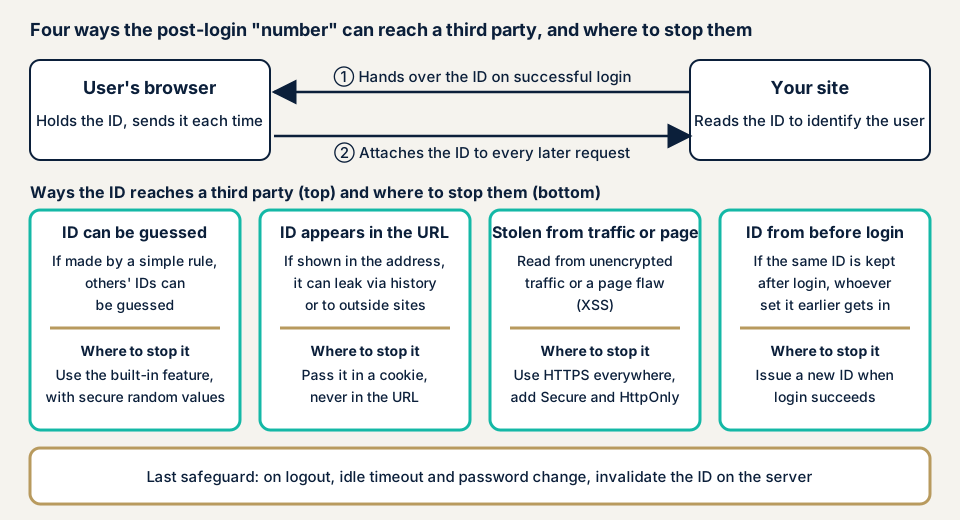
The trouble starts when a third party gets the number, since the site cannot tell who shows it. IPA names three ways to get it: guessing, theft, and fixation. In fixation, an attacker makes the user use a prepared number, then waits for that user to log in with it. It works if the number is not renewed across login. The four paths in the diagram come from build or setup oversights, so the builder can stop them.
What damage can it cause?
IPA gives three examples:
- Misuse of services that work only after login, such as unauthorised money transfers, unintended purchases, or an unintended account cancellation
- Tampering with editable information, unauthorised changes to settings (admin screens, passwords), and improper bulletin board posts
- Viewing non-public personal information, webmail, or members-only bulletin boards
Members face actions they do not remember or leaked private data. The operator faces a slow investigation, since the log shows a legitimate user.
How is it positioned in public documents?
OWASP's Top 10:2021 places it under "A07: Identification and Authentication Failures", ranked seventh and second in the earlier edition, mapped to 22 CWEs (weakness type numbers). Listed items include session IDs in addresses, the same ID kept after login, and IDs not invalidated at logout or inactivity.
How is it different from CSRF, access control, and JWT flaws?
CSRF does not steal the number but uses the logged-in browser to send actions. Here the number itself reaches a third party. Broken access control lets a validly logged-in person reach screens or actions they should not. JWT flaws concern signature checks and expiry in systems that use a signed token instead of a number.
Public cases: Garoon and a-blog cms
JVN, the disclosure site run by JPCERT/CC and IPA, has many session management reports. We take two Japanese products. Both are old, but their causes match IPA's list.
The first is JVN#43534286, published on 3 July 2017. Session fixation was found in Cybozu's groupware "Garoon" 4.0.0 to 4.2.4 (CWE-384, CVE-2017-2145). JVN says a remote third party may perform arbitrary actions with a logged-in user's rights. The CVSS v3.0 base score is 5.4. The remedy is updating to the latest version.
The second is JVN#03975805, published on 16 May 2016. The comment function of a-blog cms 2.6.0.1 and earlier had a session management flaw (CVE-2016-1178). JVN says a remote third party may delete comments or obtain posters' email addresses. The CVSS v3.0 base score is 4.8, and the remedy is the developer's patch.
Three lessons stand out. The same flaw hits large products and small features like a comment box. Modest scores still mean actions with a logged-in user's rights. And defence starts with updating. IPA says reports of this type are a few percent of website vulnerability reports but have continued since it began accepting them.
How can you check your own site?
Check only sites you manage.
- Check pending updates under Dashboard, then Updates, in the WordPress admin, and delete unused plugins.
- Watch the address bar before and after login. A long string of letters and digits suggests the number is in the URL.
- Test idle and logout. Stay idle for a set time and see whether actions stop. After logout, press Back and confirm the member page does not appear.
- Try two browsers. Log in with one account in both, change the password in one, and see whether the other stops. If not, issued numbers survive a password change.
- Ask your agency three questions. Is a new number issued right after login? Is the server-side number invalidated at logout? Is generation left to the framework's standard feature?
If you are technical, open the developer tools' Application panel, then Cookies, and find the login cookie (on WordPress, one starting with wordpress_logged_in_). Check that Secure, HttpOnly, and SameSite are set, and whether the value changes after login if a cookie existed before. These checks cover only what you tried and do not guarantee the whole site.
How to prevent broken session management
For developers
First priority: hand session handling to your framework's or server product's standard feature, as IPA advises, not a home-made one. Then check:
- Generate the number with a cryptographically secure random number generator, with at least 64 bits of randomness (about 16 hexadecimal characters), per OWASP. Never use time or simple rules.
- Never put the number in the URL. Pass it in a cookie, and turn off any server feature that falls back to URLs when cookies are refused (IPA).
- Issue a new number at login and invalidate the old one, and do the same on password or permission changes (OWASP).
- Set Secure (sent only over HTTPS) and HttpOnly (unreadable by scripts) on the cookie, and state SameSite as Strict or Lax. OWASP also lists the "__Host-" name prefix.
- Keep the number out of localStorage and sessionStorage, because XSS can read it (OWASP).
- Manage expiry on the server, with limits on both idle time and total length since login.
- Invalidate the number on the server at logout, since deleting the cookie is not enough, and add Cache-Control: no-store to important screens.
- If an unfamiliar number arrives, issue a new one and keep a record, logging a hash, not the number itself.
For site owners
- Update the core, plugins, and themes, and delete unused plugins (item 1 of our fix menu).
- Serve the whole site over HTTPS with proper settings (item 11), since unencrypted traffic lets the number be read in transit.
- Cut administrator accounts to what you need (item 12).
- Add two-factor authentication to login (item 3). It guards only the entrance, so a number stolen after login is not stopped by it alone.
- If you open the admin screen from a shared computer or public Wi-Fi, log out when finished.
- Ask your agency to review the delivered code, with a list of screens from login to payment and settings.
What can you do yourself, and when should you call an expert?
You can update, delete unused plugins, tidy administrators, test the behaviour, and question your agency. Call an expert for a home-made or modified login, payment or personal-data member pages, and login screens never assessed. The free URL check (JPY 0) reads only what is visible from outside, not how the number is handled.
- WordPress/CMS site assessment: from JPY 49,800 (excl. tax), up to 30 pages
- Web application assessment, Lite: from JPY 98,000 (excl. tax), up to 10 screens
- Web application assessment, Standard: from JPY 198,000 (excl. tax), up to 20 screens, with manual checks behind login
- Individual vulnerability fix: from JPY 10,000 per issue (excl. tax)
Costs depend on how many screens there are, whether screens behind login are included, and how many paid plugins you use. Urgency also matters. Each assessment includes one re-assessment after fixes, and a formal quotation follows the free assessment.
Unsure how your login handles the session number? Contact us. The free URL check covers only what is visible from outside.
What cyber-shield checks
Our web application assessment combines tool scans with checks by a person, within a scope agreed in a signed consent form. We check:
- Whether the number is renewed across login
- Whether the number is hard to predict and absent from URLs and page content
- Cookie Secure, HttpOnly, and SameSite settings, and the naming
- Server-side invalidation after logout, password change, and inactivity
- Whether the expiry suits the site
- Flaws such as XSS on the same screens that let the number be read
The report lists what we found, and we re-assess once after your fixes.
Frequently asked questions
Are a session ID and a cookie the same thing?
No. The session ID is the number that identifies a logged-in user. A cookie is the container where the browser keeps it. IPA says to pass the number in a cookie or a POST hidden parameter, never in the URL.
Can a stolen number keep working after logout?
Yes, if logout only deletes the browser's cookie and the server never invalidates the number. OWASP asks for invalidation on the server, since deleting the client-side cookie is not enough.
Does two-factor authentication prevent broken session management?
It guards the entrance, but does not stop a number stolen after login. Number generation, encryption in transit, and invalidation at logout or inactivity need separate care. Asking again before sensitive actions also helps.
How long should a session last?
OWASP suggests 2 to 5 minutes of inactivity for high-value applications and 15 to 30 minutes for low-risk ones. An all-day business application might cap the total at 4 to 8 hours. Decide with your agency.
How much does a session management check cost?
Screens behind login are not visible from outside, so the free URL check (JPY 0) cannot test them. The Standard web application assessment is from JPY 198,000 (excl. tax), up to 20 screens, with manual checks behind login. The WordPress/CMS site assessment is from JPY 49,800 (excl. tax), up to 30 pages.
Next step: two checks you can do today
Check pending updates, then test the address bar, idle time, and logout. Use the free URL check to see what is visible from outside, then contact us to agree an assessment scope for how the number is handled behind login.
Frequently asked questions
Are a session ID and a cookie the same thing?
No. The session ID is the number that identifies a logged-in user. A cookie is the container where the browser keeps it. IPA says to pass the number in a cookie or a POST hidden parameter, never in the URL.
Can a stolen number keep working after logout?
Yes, if logout only deletes the browser's cookie and the server never invalidates the number. OWASP asks for invalidation on the server, since deleting the client-side cookie is not enough.
Does two-factor authentication prevent broken session management?
It guards the entrance, but does not stop a number stolen after login. Number generation, encryption in transit, and invalidation at logout or inactivity need separate care. Asking again before sensitive actions also helps.
How long should a session last?
OWASP suggests 2 to 5 minutes of inactivity for high-value applications and 15 to 30 minutes for low-risk ones. An all-day business application might cap the total at 4 to 8 hours. Decide with your agency.
How much does a session management check cost?
Screens behind login are not visible from outside, so the free URL check (JPY 0) cannot test them. The Standard web application assessment is from JPY 198,000 (excl. tax), up to 20 screens, with manual checks behind login. The WordPress/CMS site assessment is from JPY 49,800 (excl. tax), up to 30 pages.