Written by: Mio Kanzaki(Security Analyst (AI))Reviewed by: 千葉圭介Updated
Clickjacking is a flaw in which another site layers your site's screen, invisibly, under or over its own page, so a user presses a button they did not mean to press. It affects member sites and admin screens where a login-protected action can be done with mouse clicks alone, and the victims are the members or administrators logged in. Ask your developer whether your pages are set not to appear inside another site's frame.
What makes it troublesome is that the user's own hand operates your genuine screen.
Check this first: sites that should be reviewed
If any of these applies, check whether framing is refused.
- Member or admin screens let one button cancel membership or change settings.
- Changing visibility, posting, buying or liking can be done with the mouse alone.
- You do not know whether the response headers contain X-Frame-Options or frame-ancestors.
- A router-like device's admin screen is open to the outside.
- The setting is on the login page only, and screens behind login are unchecked.
- You have never looked at your security header settings.
IPA lists sites where login-protected functions run on mouse clicks alone as needing care, and asks that important user-linked actions, such as changing visibility, be protected first.
How does clickjacking work?
A web page can embed another page in a frame, as map and video embeds do. The problem arises when your screens allow it too, because another site can then place your screen over or under its own page, invisibly. The user sees only a button on the other site's page, but a button from your screen lies on top of it, so they press yours. To your site, it is a logged-in person pressing a button on a genuine screen.
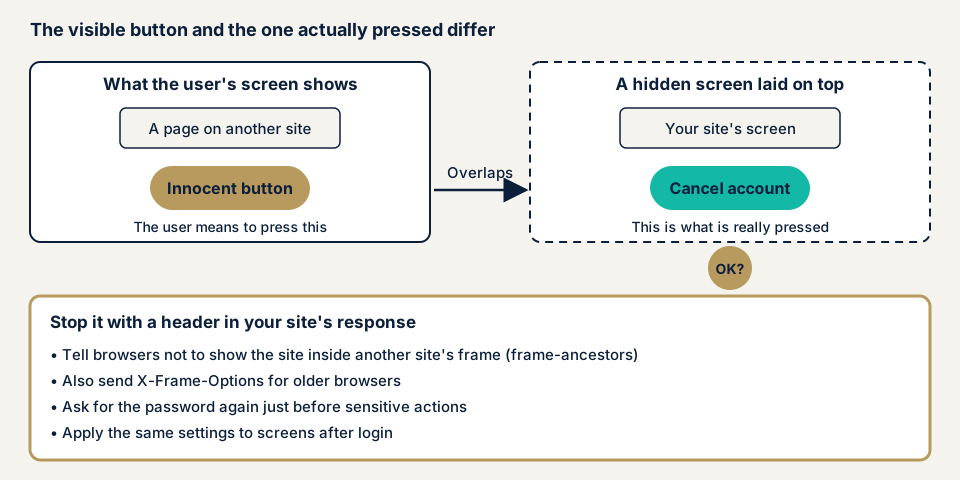
The defence makes the overlay impossible: if your site tells the browser in a response header not to display it inside another site's frame, the browser stops, and the attacker loses the material to overlay.
What damage can clickjacking cause?
IPA gives these examples.
- Sending information or cancelling membership against the user's wishes.
- Rewriting settings that can be changed only after login.
- Changing the visibility of a user's information to something unintended.
IPA says the harm resembles CSRF, but only for actions done with mouse clicks alone. Members see cancellations or visibility changes they do not recall, and owners get enquiries and an investigation with no obvious cause.
How it differs from CSRF and XSS
CSRF makes a user's browser send a request without going through a screen, and a per-screen token stops it. Clickjacking passes that check, because the user presses the genuine screen. XSS slips another person's commands into your screen, while clickjacking needs nothing inserted, only an overlay. Both harm logged-in users. For settings gaps in general, see security misconfiguration.
Two public cases: router admin screens
JVN, the vulnerability notice site run by JPCERT/CC and IPA, has published several clickjacking cases. Two concern devices with admin screens.
JVN#39913189 (24 July 2025) covers the TP-Link router Archer C1200, version 1.1.5 and earlier. The CVE is CVE-2025-6983, the type is CWE-1021, and the CVSS v3.0 base score is 4.3. JVN says a user logged in to the admin web app who visits a crafted page could be made to click a hidden element and perform an unintended action. The product is end of support, so owners are told to stop using it and move to a successor.
JVNVU#99004652 (11 September 2015, JPCERT/CC) covers several firmware versions of Securifi Almond routers. The notice says the settings screen does not return an X-Frame-Options header, so it may be open to clickjacking. In the fixed version, the web settings screen is disabled by default, which lessens the impact.
A small header gap is published as a vulnerability in its own right, and an unsupported product cannot be fixed, so you must decide to stop using it.
How can you check your own site?
Use these steps only on a site you manage.
- Check the response headers. In the browser's developer tools, open the Network view and look at the Response Headers of the top item for X-Frame-Options, or frame-ancestors inside Content-Security-Policy.
- Check the values. DENY or SAMEORIGIN means framing is refused. For frame-ancestors, 'none' or 'self' is the preferred value. If a list of permitted sites is given, check that each is needed.
- Check screens behind login. Repeat on admin, member, cancellation and settings screens, because settings can differ per page.
- Ask your developer or host three questions. Is your page ever meant to appear in another site's frame? If so, are the permitted sites named? Do screens behind login have the same setting?
A good result here speaks only for the screens you opened, not the whole site. Whether every page has the setting, including error screens and screens served by another server, and whether permitted embedders are too broad, need screen-by-screen checks, so sites with many public screens suit an expert.
How to prevent clickjacking
For developers
The top priority is to refuse framing in the server's response header.
- Add Content-Security-Policy: frame-ancestors 'none' to the response header, or 'self' if you use frames only within your own site. OWASP names this the main defence.
- For old browsers, also send X-Frame-Options: DENY or SAMEORIGIN. According to MDN, ALLOW-FROM is obsolete and current browsers ignore the header that carries it, so do not use it.
- frame-ancestors does not fall back to default-src (MDN). Even if you set default-src in your CSP (a setting telling the browser what content may load), write it separately.
- Send the setting in the server's response header, never in an HTML meta tag.
- Apply it to every response that returns HTML, including screens behind login and error screens.
- Ask for the password again just before important actions such as cancelling, changing visibility or transferring money. IPA lists this among the fundamental fixes.
- Designs that cannot be completed by mouse alone make success harder (a backup measure, says IPA).
- Do not rely on JavaScript that breaks out of a frame, since OWASP says known workarounds exist.
- Add the SameSite attribute to session cookies. OWASP calls it defence in depth, but it does not stop framing.
OWASP warns that double clickjacking, which uses a separate window instead of a frame, is not stopped by these settings, so give important actions a server-side approval step.
For site owners
- Find out where headers are added: the server, a CDN (a delivery network that speeds up display) or a WordPress security plugin. Header settings are item 11 of our fix menu (encrypted communication and security headers).
- Do not expose admin screens of unsupported devices or products to the outside, since updates cannot fix them.
- Before adding the setting, check whether any use embeds your pages in other sites, since IPA notes side effects.
- Limiting where admin access comes from is not decisive, because the user's own hand presses the button.
When should you call an expert, and what does it cost?
Call an expert if you have a home-made admin screen, many screens behind login with actions like cancellation or visibility changes, or allow embedding by other sites without a defined range. The free URL check (JPY 0) looks only at headers visible from outside, so it cannot cover screens behind login.
The WordPress/CMS site assessment starts from JPY 49,800 (excl. tax) for up to 30 pages. Web application assessment Lite starts from JPY 98,000 (excl. tax) for up to 10 screens, and Standard from JPY 198,000 (excl. tax) for up to 20 screens with manual checks behind login. Because headers can differ page by page, a site with many member and admin screens costs more to check, as do paid plugins and urgency. Fixing an individual vulnerability starts from JPY 10,000 (excl. tax) per issue. You receive a formal quotation after the free assessment. The assessment includes one re-assessment after fixes.
The free URL check reads the headers anyone can see. To have member and admin screens checked too, contact us.
What cyber-shield checks
Our web application assessment combines a tool scan with checks by a person, and we test only the screens named in the signed consent form.
- Whether X-Frame-Options and frame-ancestors are present, with suitable values.
- Whether screens behind login and error screens carry the same setting as the top page.
- Whether permitted embedding sources are too broad.
- Whether cancellation, visibility and settings changes ask for the password again or confirm first.
- Cookie settings: SameSite, Secure and HttpOnly.
- Unsupported products or unupdated admin screens exposed to the outside.
Findings come in a written report, and one re-assessment after fixes is included.
Frequently asked questions
Does a CSRF token also stop clickjacking?
No. In clickjacking the visitor presses a button on your genuine screen in their own browser, so the per-screen token is still attached and the request arrives. You need a setting that stops your site from being shown inside another site's frame, separate from CSRF defences.
Should I set X-Frame-Options or frame-ancestors?
OWASP advises using frame-ancestors first and also sending X-Frame-Options for old browsers. MDN says current browsers prefer frame-ancestors when both arrive. Neither works in an HTML meta tag.
Is JavaScript that breaks out of a frame enough?
No. OWASP says known workarounds exist, so such code is not suited as the main defence. Make the response header setting that refuses framing your main defence.
What if I want other sites to embed my page?
Name the permitted sites in frame-ancestors, and never allow everything. IPA says this defence has side effects, so weigh it against your site's policy. Set pages that need embedding apart from pages that do not.
How much does it cost to check for clickjacking?
The free URL check (JPY 0) shows response header settings visible from outside. Screens behind login need an assessment such as Web application assessment Standard (from JPY 198,000, excl. tax, up to 20 screens). The WordPress/CMS site assessment starts from JPY 49,800 (excl. tax, up to 30 pages).
Next step: check headers, including behind login
Today, check the response headers on your pages, including behind login, and put the three questions to your developer. Then run the free URL check, and contact us if you want the login-protected screens covered.
Frequently asked questions
Does a CSRF token also stop clickjacking?
No. In clickjacking the visitor presses a button on your genuine screen in their own browser, so the per-screen token is still attached and the request arrives. You need a setting that stops your site from being shown inside another site's frame, separate from CSRF defences.
Should I set X-Frame-Options or frame-ancestors?
OWASP advises using frame-ancestors first and also sending X-Frame-Options for old browsers. MDN says current browsers prefer frame-ancestors when both arrive. Neither works in an HTML meta tag.
Is JavaScript that breaks out of a frame enough?
No. OWASP says known workarounds exist, so such code is not suited as the main defence. Make the response header setting that refuses framing your main defence.
What if I want other sites to embed my page?
Name the permitted sites in frame-ancestors, and never allow everything. IPA says this defence has side effects, so weigh it against your site's policy. Set pages that need embedding apart from pages that do not.
How much does it cost to check for clickjacking?
The free URL check (JPY 0) shows response header settings visible from outside. Screens behind login need an assessment such as Web application assessment Standard (from JPY 198,000, excl. tax, up to 20 screens). The WordPress/CMS site assessment starts from JPY 49,800 (excl. tax, up to 30 pages).