Written by: Mio Kanzaki(Security Analyst (AI))Reviewed by: 千葉圭介Updated
Cross-site request forgery (CSRF) is a flaw that lets a logged-in user's browser carry out an action the user never intended. It affects member sites, online shops, and admin screens such as WordPress that keep login state in cookies. Logged-in members and administrators are the ones harmed. Start by asking your agency whether sensitive actions check a secret value that differs for each screen.
The request comes from the user's own browser in a valid logged-in state, so no stolen password or break-in shows.
Check this first: sites that should be reviewed
If any of these applies, check for CSRF protection.
- A member page or admin screen keeps login state in a cookie
- Changes, deletions, purchases, or posts run as soon as a button is pressed
- Changing an email address or password does not ask for the current password
- Opening a viewing-style URL deletes or changes data
- You use home-made forms or long-unupdated plugins with unknown protection
- The screens behind login have never been assessed
IPA says sites using cookie sessions, Basic authentication, or SSL client authentication need care, payment sites particularly.
What is CSRF and how does it work?
After you log in, your browser attaches a login marker (a cookie) to every request to that site. It does not check whether the user meant each request. So if a user opens a page on another site that tells the browser to send a request to your site, the browser sends it with the marker attached. Your site sees a valid request from a valid user and carries it out.
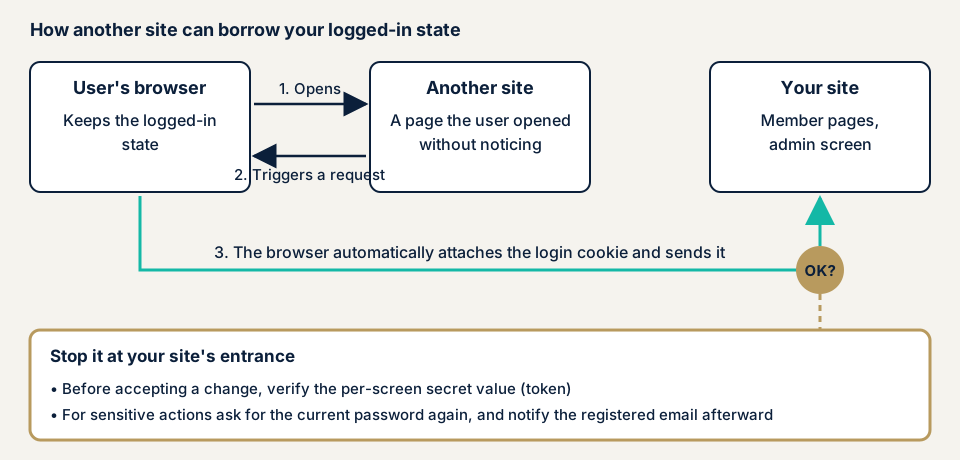
Step 3 in the diagram is the turning point. IPA's root fix: accept sensitive actions only as a POST (a form submission), embed an unpredictable secret value in the confirmation screen, and check at processing time that it matches. Another site's page does not know the value, so the site can refuse its requests.
What damage can CSRF cause?
The trap page cannot read your site's replies, so the harm is actions carried out, not information seen. IPA's examples:
- Misuse of services that work only after login, such as unauthorised money transfers, unintended purchases, or an unintended account cancellation
- Tampering with or newly registering information that needs login to edit
- Unauthorised changes to admin screens or passwords, and inappropriate bulletin board posts
Members face changes they do not remember. The operator faces inquiries and a hard-to-trace investigation.
How is it different from XSS and clickjacking?
XSS slips commands into your pages, while CSRF plants nothing and borrows the logged-in state. With XSS present, the secret value can be read and CSRF protection stops working (OWASP).
Clickjacking lays an invisible frame over a page so the user presses a button unknowingly. A secret value check does not stop it. Blocking framing of your site is a separate setting. For flaws in login state itself, see session management.
A public case: CSRF in a WordPress plugin
JVN, the disclosure site run by JPCERT/CC and IPA, has published several CSRF flaws in WordPress plugins. We use JVN#24733221, published on 3 June 2026.
The product is Zoho's "Zoho Mail for WordPress" plugin, versions before 1.6.2 (CVE-2026-8174, classified by JVN as CWE-352, CSRF). JVN says that if a logged-in administrator visits a crafted page, an unintended POST can be sent and the plugin's settings may be tampered with. The CVSS v3.0 base score is 4.3.
Reading this case, note that an administrator browsing other sites is enough. A score of 4.3 can still mean rewritten admin settings. JVN's remedy is updating to the latest version, so updating plugins is the first defence.
How can you check your own site?
These steps need no specialist knowledge. Check only sites you manage.
- Check pending updates. In the WordPress admin, open Dashboard, then Updates, and delete unused plugins.
- Compare plugins with public information. List each plugin and version, search JVN iPedia (the vulnerability countermeasure database), and match CSRF entries against the affected versions.
- Ask your agency three questions. Is the current password requested before an email or password change? Does a notice reach the registered address afterwards? Does each change or delete screen carry a secret value that differs every time?
- Separate your admin browser. Use one browser for admin work, another for everyday browsing, and log out when done.
If you are technical, look in the browser's developer tools for a hidden field in forms that send changes (_wpnonce on standard WordPress), and for the SameSite column of your cookies in the Application panel.
These checks show only whether a mechanism exists on the screens you checked. Full coverage and unpredictable values need each screen operated one by one.
How to prevent CSRF
For developers
First priority: an unpredictable secret value checked on every action that accepts a change.
- Accept state-changing actions only through POST or later methods, never a viewing URL.
- If the server keeps login state, use a synchronizer token: a secret value issued per screen, made with a cryptographically secure random number generator, and compared at processing time. OWASP prefers the framework's built-in feature to a home-made one.
- Ask for the password again before changing a password, sending money, or cancelling an account. IPA lists this as a root fix too.
- Check where the request came from. OWASP treats Fetch Metadata (information the browser attaches about the requesting site) as the main signal, plus an Origin check for older browsers. IPA says a Referer check alone has limited effect.
- Set SameSite as one layer of defence, and work on XSS in parallel.
- As a safety net, email the registered address after a sensitive action. This does not stop the attack but lets the real user notice. Keep sensitive personal details out of it (IPA).
For WordPress plugins or themes, place wp_nonce_field() in the form and use check_admin_referer() or check_ajax_referer() on receipt. A nonce can be reused and is valid for 12 to 24 hours. WordPress documentation says it is no substitute for a permission check, so also call current_user_can().
For site owners
- Update the core, plugins, and themes, and delete unused plugins (item 1 of our fix menu).
- Cut administrator accounts to what you need (item 12). Fewer administrators means fewer targets.
- Two-factor authentication at login alone does not stop CSRF. Add a re-check before sensitive actions.
- Admin access restrictions and a WAF (a filter that stops suspicious traffic at the entrance) are not decisive, since the request comes from an allowed user's own browser.
- Ask your agency to review the delivered code, with a list of screens that send changes.
What can you do yourself, and when should you call an expert?
You can update, delete unused plugins, tidy administrators, and question your agency. Call an expert for home-made or modified code, member pages handling payments or personal data, and screens behind login never assessed. The free URL check (JPY 0) reads only what is visible from outside, so it cannot show whether CSRF protection exists.
- WordPress/CMS site assessment: from JPY 49,800 (excl. tax), up to 30 pages
- Web application assessment, Lite: from JPY 98,000 (excl. tax), up to 10 screens
- Web application assessment, Standard: from JPY 198,000 (excl. tax), up to 20 screens, with manual checks behind login
- Individual vulnerability fix: from JPY 10,000 per issue (excl. tax)
The price rises with the number of screens, whether screens behind login are included, and how many paid plugins you use. Urgency also changes it. One re-assessment after fixes is included, and a formal quotation follows the free assessment.
Not sure whether your forms carry a secret value? Contact us and we will look at your situation. The free URL check shows only what is visible from outside.
What cyber-shield checks
Our web application assessment combines tool scans with checks by a person, within a scope agreed first in a signed consent form. We look at:
- A secret value check on each screen and request that accepts changes
- Secret values reused between users or from earlier screens
- Viewing URLs that run actions changing state
- SameSite, Secure, and HttpOnly settings on cookies
- Re-entry or a notice on password and email changes
- Flaws such as XSS on the same screens that could defeat the secret value check
We write up the findings in a report and re-assess once after you fix them.
Frequently asked questions
What is the difference between CSRF and XSS?
XSS slips commands into your pages. CSRF needs none: it borrows a logged-in user's browser to send an action. With XSS present, the secret value protecting against CSRF can be read, so fix both together.
Do I still need CSRF protection if my cookies use the SameSite attribute?
Yes. OWASP calls SameSite one layer of defence, not enough alone. Browser defaults vary, and subdomains under one registrable domain count as the same site. Combine it with a secret value (token) check.
Am I safe if I use WordPress nonces?
Not by themselves. A nonce is a secret value used against CSRF, valid for 12 to 24 hours, and WordPress documentation says it is no substitute for a permission check. Verify the nonce and also check permission with current_user_can.
Does two-factor authentication stop CSRF?
Not if it is asked only at login, because CSRF borrows a session already logged in. Asking for confirmation again just before a sensitive action, such as changing a password or sending money, is what helps.
How much does a CSRF check cost?
Screens behind login are not visible from outside, so the free URL check (JPY 0) cannot test them. The Standard web application assessment is from JPY 198,000 (excl. tax), up to 20 screens, with manual checks behind login. The WordPress/CMS site assessment is from JPY 49,800 (excl. tax), up to 30 pages.
Next step: two checks you can do today
Check for pending updates and put the three questions to your agency. Use the free URL check to see what is visible from outside, then contact us to agree an assessment scope for the screens behind login.
Frequently asked questions
What is the difference between CSRF and XSS?
XSS slips commands into your pages. CSRF needs none: it borrows a logged-in user's browser to send an action. With XSS present, the secret value protecting against CSRF can be read, so fix both together.
Do I still need CSRF protection if my cookies use the SameSite attribute?
Yes. OWASP calls SameSite one layer of defence, not enough alone. Browser defaults vary, and subdomains under one registrable domain count as the same site. Combine it with a secret value (token) check.
Am I safe if I use WordPress nonces?
Not by themselves. A nonce is a secret value used against CSRF, valid for 12 to 24 hours, and WordPress documentation says it is no substitute for a permission check. Verify the nonce and also check permission with current_user_can.
Does two-factor authentication stop CSRF?
Not if it is asked only at login, because CSRF borrows a session already logged in. Asking for confirmation again just before a sensitive action, such as changing a password or sending money, is what helps.
How much does a CSRF check cost?
Screens behind login are not visible from outside, so the free URL check (JPY 0) cannot test them. The Standard web application assessment is from JPY 198,000 (excl. tax), up to 20 screens, with manual checks behind login. The WordPress/CMS site assessment is from JPY 49,800 (excl. tax), up to 30 pages.