Written by: Mio Kanzaki(Security Analyst (AI))Reviewed by: 千葉圭介Updated
SQL injection is a flaw in how a website is built: text typed into an input field is treated as part of an instruction to the database. Any site with a screen that talks to a database is affected, including sign-up, login, search, and ordering pages. Check how those screens are written and whether the plugins and libraries you use still get updates.
This page draws on IPA (Japan's Information-technology Promotion Agency) and OWASP (a non-profit that researches web security). It contains no attack strings or steps. If you suspect damage already, start with our emergency guide.
Check this first: sites that should be reviewed
Review your site if any of these describes it.
- Your site stores user data in a database through sign-up, login, orders, or bookings
- Search, filtering, or sorting runs on code written in-house, or an agency built a custom form with no documentation left
- You run WordPress with plugins that no longer receive updates
- When something breaks, the screen shows the database type or internal error text
The more items apply, the higher the priority. A site that matches none of them is not proven safe.
What is SQL injection? How it works, in everyday terms
A database is a large cabinet holding member lists and order history. A website asks its clerk for information using SQL (a language for telling a database "find the people who match this condition"). If the site glues a user's typed value into the request text, special characters in that value can change the request itself. It is like a clerk who obeys a note handed over the counter as if the manager wrote it.
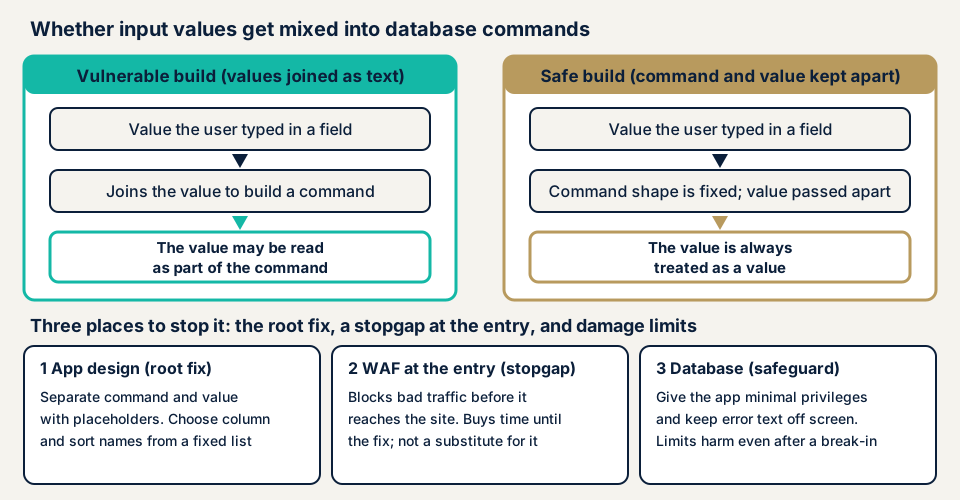
On the right of the diagram, the shape of the request is fixed in advance and values are passed separately, so a value cannot be read as a command. That method is called a placeholder (a bound parameter).
What damage can it cause?
IPA lists these kinds of damage.
- Private information is viewed, and personal data leaks
- Data is altered or deleted
- Pages are defaced
- Passwords are changed
- The system stops
- Authentication is bypassed, so someone logs in as a user
Under some conditions, commands also reach the server's operating system. The server can then be taken over and used as a stepping stone. Our OS command injection page covers that flaw. An update cannot fix SQL injection, because the cause is how each screen is written. Every new screen can add a weak spot.
What do public statistics and cases show?
Every figure below was checked against its original source. IPA's Q4 2025 release counted 88 website vulnerability reports for the quarter and 13,467 cumulatively since its reporting program began (published 22 January 2026). IPA's "How to Create a Secure Website" says SQL injection made up 11% of website reports cumulatively through Q4 2014, and cross-site scripting about half.
JVN iPedia, IPA's vulnerability database, registered 11,605 Japanese-language entries in Q1 2026. CWE-89, which covers SQL injection, accounted for 393, the fourth highest cause type. Most entries describe software products. In OWASP's Top 10, injection ranked third in 2021 and fifth in 2025.
A case published by IPA
"How to Create a Secure Website" lists products where SQL injection was found, including "DBD::PgPP", "Piwigo", and Cybozu "Garoon". Each was fixed. IPA also notes reported cases where an implementation passed the SQL statement itself through a hidden parameter (an input field not shown on screen). Widely used and enterprise products can contain the same flaw. A product flaw is fixed by the vendor's patch. Screens written by your company or agency can only be fixed by rewriting them.
How can a site owner check for it?
You cannot tell whether the flaw exists without reading the code, but an owner can check four things from screens and settings. Do not type attack-style strings into your live site, because that can take it down or damage data.
- Update status. On WordPress, open Plugins, then Installed Plugins, and list those showing an update notice or last updated years ago. Delete what you do not use, because a plugin without updates gets no fix for new flaws.
- Error display. Check whether the debug setting in wp-config.php is still on in production, and look at the PHP error-display option in your hosting control panel. Errors should go to the log, not the screen.
- Your agency's answers. Ask whether queries use placeholders (prepared statements) and whether any assessment followed post-launch changes. Vague answers are a reason to book an assessment.
- Logs. A burst of requests to one screen, or a sudden rise in unusual errors, is a cue to investigate.
These checks show risky conditions. They do not prove that no flaw exists.
How to prevent SQL injection
For developers: stop it in code
IPA separates the root fix from supporting measures that limit damage. The most reliable step is to build every SQL statement with placeholders. IPA rates the static kind, where the database assigns the values, above the dynamic kind. In principle, no flaw can arise with the static kind. OWASP names parameterized queries as the first line of defence. This PHP (PDO) pattern passes the statement and the value separately.
$sql  = 'SELECT id, name FROM members WHERE email = :email';
$stmt = $pdo->prepare($sql);
$stmt->execute([':email' => $email]);
Table names, column names, and sort direction cannot be passed as placeholder values, so let the application choose them from a list of allowed options. Do not pass the SQL statement itself through a hidden parameter. Input checks are only a supplement. To limit damage if a defence fails, give the database account only the permissions it needs. Keep error details out of the browser. Replace libraries that no longer get updates.
For site owners: layer it through operations
Keep the core, themes, and plugins current. Take daily backups and practise restoring one. Order an assessment each time the code changes. A WAF (a filter in front of the site) is a stopgap until the code is fixed. It does not replace fixing the flaw.
What can you do yourself, and when should you call an expert?
Checking updates, error display, and logs is within your reach. Whether the processing behind an input field has a flaw is only revealed by an assessment. Amounts exclude tax and "from" marks the minimum.
- Free URL check: JPY 0 (looks only at what anyone can see from outside, so it cannot tell you whether SQL injection exists)
- WordPress/CMS site assessment: from JPY 49,800 (excl. tax), up to 30 pages
- Web application assessment, Lite: from JPY 98,000 (excl. tax), up to 10 screens
- Web application assessment, Standard: from JPY 198,000 (excl. tax), up to 20 screens, with manual checks behind login
- Individual vulnerability fix: from JPY 10,000 per issue (excl. tax), quoted by content
Price rises with screen count, login-protected screens, and custom functionality. A formal quotation follows the free assessment.
To see where you stand, try the free URL check, which needs only your site's URL. If you are unsure whether an assessment is needed, contact us.
What cyber-shield checks
A tool scan runs first, then a person checks by hand. For SQL injection, we list the screens that connect to a database, such as input fields, search, and sorting. We check how input is received and how errors are displayed. A non-disclosure agreement (NDA) and a consent form come first. Any check with possible impact runs in a time window agreed in advance.
We report what we find and, if you wish, carry out the fixes. One re-assessment after the fix is free. We do not test sites without the owner's permission, and an assessment is not a guarantee of future safety. See the web application vulnerability assessment page.
Frequently asked questions
What is SQL injection, in one sentence?
Text typed into an input field is treated as part of an instruction to the database. IPA says this can lead to private data being viewed, personal information leaking, and data being altered or deleted.
Can it happen on a WordPress site?
Yes. It tends to come from plugins, themes, or custom code more than from WordPress itself. Check the Plugins screen for parts that are no longer updated.
Does a WAF stop SQL injection?
A WAF (a filter that blocks suspicious traffic) is a useful stopgap, but it does not repair the flaw in the code. The root fix is to pass the SQL statement and its values separately.
How can I tell whether my site has this flaw?
The free URL check cannot tell you, because it only sees what is visible from outside. An assessment tests how input is processed, using tools plus a person's review, after a signed consent. The Lite assessment starts from JPY 98,000 (excl. tax).
What should I do first if I think data was taken?
Take the site offline or close the affected form, and keep the server logs and backups as they are. Then contact a specialist, and consider reporting to the authorities if personal data is involved.
Next step: list the screens that have input fields
Write down the screens on your site that connect to a database, such as search, login, contact, ordering, and account changes. That list can serve as the scope of an assessment as it stands.
Then check how your site looks from outside with the free URL check. If you need screen-by-screen checks, contact us and we will decide together what you handle and what to hand over.
Frequently asked questions
What is SQL injection, in one sentence?
Text typed into an input field is treated as part of an instruction to the database. IPA says this can lead to private data being viewed, personal information leaking, and data being altered or deleted.
Can it happen on a WordPress site?
Yes. It tends to come from plugins, themes, or custom code more than from WordPress itself. Check the Plugins screen for parts that are no longer updated.
Does a WAF stop SQL injection?
A WAF (a filter that blocks suspicious traffic) is a useful stopgap, but it does not repair the flaw in the code. The root fix is to pass the SQL statement and its values separately.
How can I tell whether my site has this flaw?
The free URL check cannot tell you, because it only sees what is visible from outside. An assessment tests how input is processed, using tools plus a person's review, after a signed consent. The Lite assessment starts from JPY 98,000 (excl. tax).
What should I do first if I think data was taken?
Take the site offline or close the affected form, and keep the server logs and backups as they are. Then contact a specialist, and consider reporting to the authorities if personal data is involved.