Written by: Mio Kanzaki(Security Analyst (AI))Reviewed by: 千葉圭介Updated
Server-side request forgery (SSRF) is a flaw that lets someone use your site's server to contact places it was never meant to reach. It affects sites that fetch content from a URL, use webhooks (a way to notify another service automatically), create PDFs, or connect to outside services. Start by counting where your site accepts a URL and who can use each place.
Check this first: sites that should be reviewed
If any of these applies, check for SSRF defences.
- Admin screens or forms import images, articles, calendars or RSS from a URL.
- Webhook or integration settings accept a typed destination URL.
- Pasted links produce an automatic title or image preview.
- The site converts screens to PDF or images, or imports files.
- The site runs on a cloud server such as AWS.
- Members or logged-out visitors can use a URL-fetch feature.
- A product or plugin has gone six months without an update.
OWASP says SSRF arises when an application fetches a remote resource without validating the supplied URL, even behind a firewall, VPN or network access control.
How does SSRF work?
A feature that accepts a URL makes the server fetch it for the user, so the request comes from the server, not the visitor's computer. The server can freely reach your internal network and the endpoint that returns its own settings, like a neighbouring room. Unless destinations are restricted, whatever the user typed goes through.
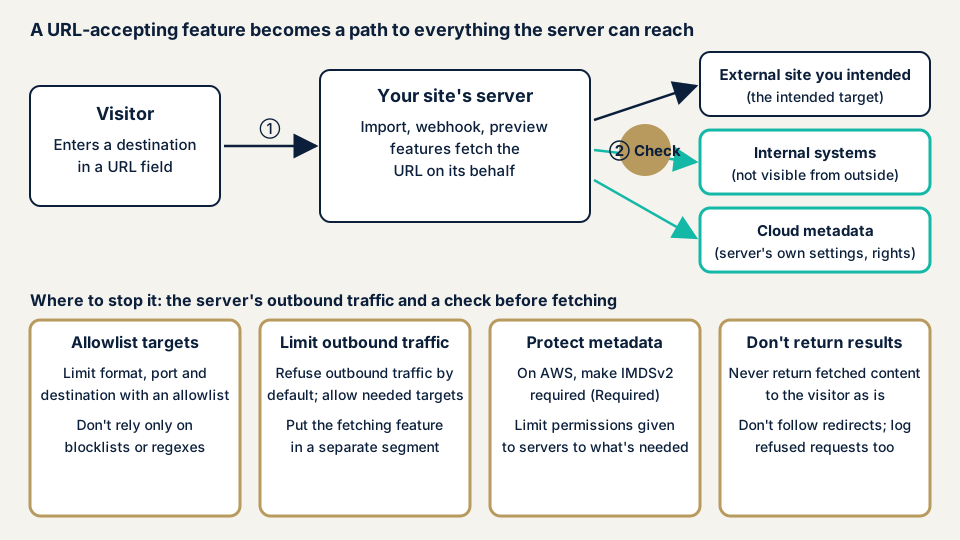
Step 2 in the diagram is the fork: with an allow list, unexpected destinations stay out of reach, and without one, anything the server can reach is a target. MITRE's CWE-918 (a catalogue of software weaknesses) describes a server fetching a URL without checking the destination.
What damage can SSRF cause?
OWASP lists four attack scenarios:
- Port scanning of internal servers.
- Leakage of sensitive data hidden from outside.
- Access to cloud metadata, the endpoint that returns a server's own settings and permissions.
- Compromise of internal services.
The damage depends on where the server can reach and what permissions it holds. In OWASP Top 10:2021, SSRF ranks tenth, added because the community survey placed it first. The data shows one CWE, 9,503 occurrences and 385 CVEs. The incidence rate (2.72%) is low, but the exploit score (8.28) and impact score (6.72) are high.
How it differs from XXE and CSRF
XXE starts from an XML-reading feature and can expose server files or trigger outside requests, so check it together with SSRF. CSRF abuses a logged-in visitor's browser, while SSRF abuses the server.
Two public cases: a-blog cms and Apache Allura
JVN, the vulnerability notice site run by JPCERT/CC and IPA, has published SSRF notices repeatedly. Two follow.
JVNVU#90760614 (14 May 2025) reports SSRF (CWE-918, CVE-2025-36560) in a-blog cms, a CMS made in Japan. JVN says a crafted request could give access to sensitive information. The CVSS v4.0 base score is 9.2 (v3.1: 8.6). Combined with CVE-2025-41429, it could let someone take over a legitimate user's session. The fix is to update and apply the developer's workarounds. Unsupported older versions are affected too, so check the maintenance policy.
JVN#06609828 (18 August 2026) covers Apache Allura before version 1.19.1. JVN found SSRF (CWE-918, CVE-2026-69223). It says the webhook feature could let someone send arbitrary requests to internal network URLs. The CVSS v4.0 base score is 5.1. The fix is to update to 1.19.1 or later.
In both cases a URL-taking feature is the entrance, and the first fix is an update. For Allura, JVN's rating says exploitation needs high privileges, which no longer holds if members or visitors can use the feature.
How can you check your own site?
Do this only on a site you manage.
- Count the places that take a URL. List import, destination, preview and file-import fields in admin screens, forms and integration settings.
- Find out who can use each one. Admins, members, or anyone? A wider audience means higher risk.
- Check pending updates. In WordPress, open Dashboard, then Updates, and delete unused integration plugins.
- Match your products against public information. Search JVN iPedia (a vulnerability countermeasure database) for your product names and versions, looking for SSRF or CWE-918.
- Ask your developer or host whether outbound traffic is limited to the destinations the server needs.
- If you use AWS, review the metadata settings. In the EC2 console, select the instance, then choose Actions, Instance settings, Modify instance metadata options. Check that IMDSv2 is set to Required.
Before changing step 6, confirm that nothing relies on IMDSv1. AWS advises requiring IMDSv2 only after the CloudWatch metric MetadataNoToken reaches zero. By default both versions are usable.
Tests that send requests to internal systems can affect your host or partners, even on your own site, so leave them to a specialist. A clean result covers only what you checked and does not guarantee the whole site is safe.
How to prevent SSRF
For developers
- Top priority: limit the URL scheme (http or https), port and destination host with an allow list. Deny lists and regular expressions are easily bypassed (OWASP, CWE-918).
- Validate input strictly and reject anything outside the accepted form.
- Do not follow HTTP redirects.
- Return only the needed fields of a fetched result.
- Interpret the URL the same way at validation and at request time, to guard against DNS rebinding and check-to-use gaps (OWASP).
- Put the fetching feature in a separate network segment to limit a breach.
- Log both allowed and refused requests (OWASP).
For site owners
- Update the core, plugins, themes and integrations, and delete what you do not use (item 1 of our fix menu).
- Limit URL-fetch features to those who need them, and tidy admin accounts (item 12).
- Deny outbound traffic by default and allow only what is needed, as OWASP recommends.
- On AWS, require IMDSv2, which AWS describes as defence in depth against open firewalls, reverse proxies and SSRF flaws. An account-level setting (httpTokensEnforced) can make it the default. Other clouds have similar endpoints, so check their documents.
- Limit the server's permissions. Key leaks are covered on the access key leak page.
- Keep outbound logs. Cloud logs help you notice anomalies.
- Use a WAF (a filter that stops suspicious traffic at the entrance) as a supplement only, because the URL itself looks legitimate.
What can you do yourself, and when should you call an expert?
You can list URL fields, run updates, delete unused integrations, tidy admin accounts and question your developer. Call an expert if you built or modified a URL-accepting feature, if the cloud site holds personal or near-payment data, or if members and visitors can use URL-fetch features. The free URL check (JPY 0) looks only at what is visible from outside, so it cannot tell you whether SSRF exists. Prices below are in yen.
- WordPress/CMS site assessment: from JPY 49,800 (excl. tax), up to 30 pages
- Web application assessment Lite: from JPY 98,000 (excl. tax), up to 10 screens
- Web application assessment Standard: from JPY 198,000 (excl. tax), up to 20 screens, with manual checks behind login
- Cloud configuration assessment: from JPY 98,000 (excl. tax) per account
- Individual vulnerability fix: from JPY 10,000 (excl. tax) per issue
The amount depends on how many screens are in scope, whether screens behind login are included, how many paid plugins you run, and how urgent the work is. The formal quotation follows the free assessment, and a re-assessment after fixes is included once.
Use the free URL check to see what is visible from outside your site. If you cannot tell which features take a URL, contact us and we will agree an assessment scope.
What cyber-shield checks
Our web application assessment combines a tool scan with checks by a person. The scope is agreed in a consent form first, and checks that send requests inward are done so that production is not affected.
- Every feature that takes a URL: import, webhook, preview, conversion and file import.
- Whether an allow list limits destinations and other requests are refused.
- Whether redirects are followed or fetched results returned as they are.
- Whether each feature is limited to the people who need it.
For cloud sites, the cloud configuration assessment also reviews metadata settings and server permissions. The findings come in a written report.
Frequently asked questions
How is SSRF different from CSRF?
CSRF uses a logged-in visitor's browser to send actions to your site. SSRF uses your site's server to contact other places it can reach. They target different things, so they are separate flaws.
Why is SSRF a bigger problem for sites that run in the cloud?
OWASP says cloud adoption and more complex architectures have made SSRF more severe. Its examples include reaching cloud metadata, the internal endpoint that returns a server's own details.
Is blocking internal addresses with a deny list enough?
No. OWASP advises against deny lists and regular expressions, and MITRE CWE says deny lists are often bypassed. Base your defence on an allow list of permitted destinations.
Does requiring IMDSv2 fix SSRF?
No. It protects only the AWS metadata endpoint. A site feature that can contact other internal systems remains, so also limit what the application fetches and the server sends out.
How much does it cost to check for SSRF?
The free URL check (JPY 0) sees only what is visible from outside, so it does not test features behind admin screens. Web application assessment Lite starts from JPY 98,000 (excl. tax, up to 10 screens) and Standard from JPY 198,000 (excl. tax, up to 20 screens). The cloud configuration assessment starts from JPY 98,000 (excl. tax, one account).
Next step: list the URL fields and check pending updates
Today, list every place your site accepts a URL and check pending updates. Then use the free URL check to see what is visible from outside, and contact us to agree an assessment scope.
Frequently asked questions
How is SSRF different from CSRF?
CSRF uses a logged-in visitor's browser to send actions to your site. SSRF uses your site's server to contact other places it can reach. They target different things, so they are separate flaws.
Why is SSRF a bigger problem for sites that run in the cloud?
OWASP says cloud adoption and more complex architectures have made SSRF more severe. Its examples include reaching cloud metadata, the internal endpoint that returns a server's own details.
Is blocking internal addresses with a deny list enough?
No. OWASP advises against deny lists and regular expressions, and MITRE CWE says deny lists are often bypassed. Base your defence on an allow list of permitted destinations.
Does requiring IMDSv2 fix SSRF?
No. It protects only the AWS metadata endpoint. A site feature that can contact other internal systems remains, so also limit what the application fetches and the server sends out.
How much does it cost to check for SSRF?
The free URL check (JPY 0) sees only what is visible from outside, so it does not test features behind admin screens. Web application assessment Lite starts from JPY 98,000 (excl. tax, up to 10 screens) and Standard from JPY 198,000 (excl. tax, up to 20 screens). The cloud configuration assessment starts from JPY 98,000 (excl. tax, one account).